
AI Voice Agent
An AI Voice Agent That Answers Like Your Best Person
The RingQ AI Voice Agent talks with callers in their own language, answers from your instructions and business facts, and sends each call to the right team by keyword.
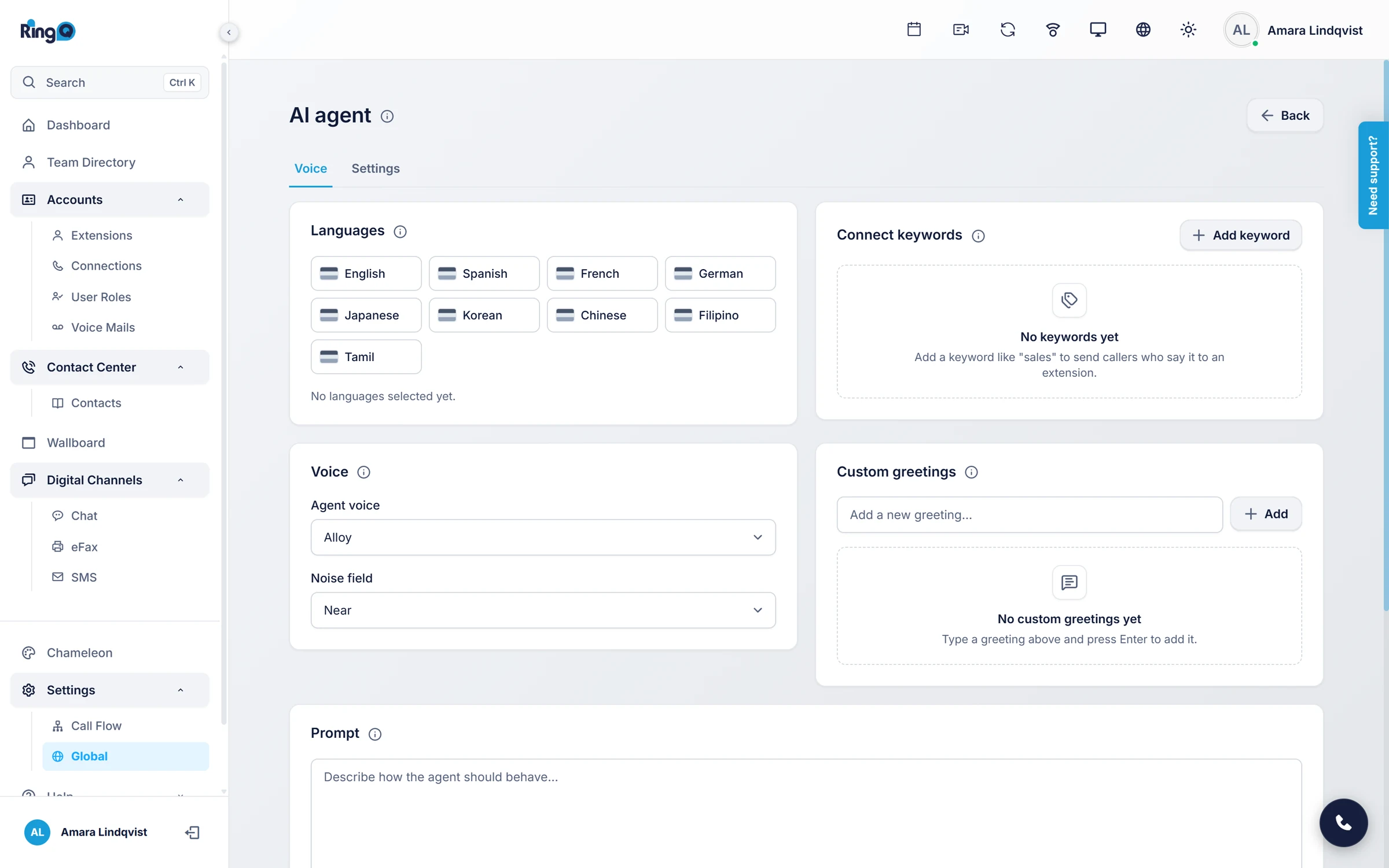
Voice AI Inside Your Phone System
No separate voice bot to buy or connect. The AI Voice Agent runs on your RingQ system and hands calls to your extensions, queues and groups.
Speaks Your Callers' Languages
Turn on the languages you need and the agent detects and answers in the caller's language.
Natural AI Voices
Pick the voice that suits your brand, with a custom greeting as the first thing callers hear.
Keyword Routing
When a caller says words like billing or support, the call goes to the extension or queue you choose.
Your Instructions and Facts
A prompt sets the role, tone and limits; the context box holds your hours, products and policies.
- 01Conversation
A Voice Agent That Sounds Like Part of Your Team
Callers talk normally, without menus. The AI Voice Agent listens, understands the question and answers in a natural voice, in any of the languages you turn on. Noise tolerance can be set to Near for quiet offices or Far for busy, noisy calls.
- Multiple languages
- Choice of voices
- Custom greeting
- Near and far noise
- 02Instructions
Tell It How to Behave in Plain Words
Write the prompt like a brief for a new colleague: who it is, what it helps with, how it should sound, and when to hand over to a person. Add the facts it needs in the context box, such as business hours, prices, products and common fixes. Both save automatically.
- Role
- Scope
- Tone
- Escalation
- Do not
- 03Routing
Send Each Caller to the Right Place
Connect keywords to destinations. When the agent hears a keyword, it connects the caller to the extension, queue or group you picked, so sales calls reach sales and billing calls reach accounts without a keypad menu.
AI Agent
Languages
EN · ES · AR
Voice
Alloy
Noise
Far
Greeting
“Thanks for calling Northwind Travel. I can help with bookings, changes and billing. What can I do for you?”
Connect keywords
- billingAccounts queue · 6201
- technicalSupport queue · 6202
- salesSales group · 6300
Set up in minutes
Four steps to your AI Voice Agent
- 1
Open AI Agent settings
In the RingQ web app, go to Settings > Global Settings > AI Agent.
- 2
Set languages, voice and greeting
Pick the languages, the AI voice, the noise tolerance and the first message callers hear.
- 3
Add your prompt and context
Describe the role and paste the facts it should use, then add keywords for routing.
- 4
Connect OpenAI
Paste your OpenAI API key in the ChatGPT Token field and save.
Step-by-step instructions with screenshots: AI Voice Agent guide
Frequently asked questions
What is the RingQ AI Voice Agent?
It is an AI agent built into the RingQ phone system that answers calls by voice, follows your prompt and business information, and connects callers to the right extension or queue by keyword.
Which AI does the voice agent use?
The voice agent uses OpenAI with your company's own API key, entered as the ChatGPT Token in the AI Agent settings. You pay OpenAI directly for what you use.
How is it different from the AI Receptionist?
The AI Voice Agent is one company-wide agent set up in Global Settings. AI Receptionists let you create several agents, each with its own extension, AI provider, knowledge sources and connectors for calendars and email.
Can it speak more than one language?
Yes. Turn on each language you need with the flag icons and the agent detects the caller's language and answers in it.
More RingQ AI