
Every call recording, encrypted
RingQ encrypts every call recording, and its transcript and AI summary, straight after the call. Standard encryption is on by default and changes nothing for your team. Strict locks recordings with your company's own key, so RingQ can lock them but never open them.
Three levels, one switch
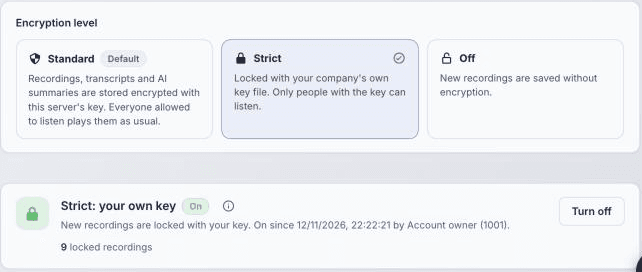
The account owner picks the level in Global Settings > Security > Recording encryption.
Standard
On by defaultKey held by your RingQ server
Every new recording, transcript and AI summary is stored encrypted. Your team plays them as usual, with nothing to unlock.
Strict
OptionalKey held only by your company
Recordings are locked with your own key file. Only people with the key can listen, not even RingQ.
Off
No encryption
New recordings are saved without encryption, for companies that encrypt storage another way.
How a recording is encrypted
It happens on its own after every call, with nothing for agents to do.
Step 1
Call ends
The recording is saved as usual
Step 2
AI step
Transcript, summary and sentiment, if AI Transcribe is on
Step 3
Encrypted
AES-256-GCM, with a new key for every recording
Step 4
Stored encrypted
Server, remote archive and backups
Step 5
Played by your team
Standard: plays as usual. Strict: your key file, or Face ID on the phone
Strict: your key stays with you
With Strict, the key pair is made in your browser. Only the public key is sent to RingQ. Without the key file and its passphrase, locked recordings can never be opened, not even by RingQ, so keep a recovery key somewhere safe.
Your company
Private key file (.rqkey) + passphrase
- Made in your browser when you turn encryption on
- Optional recovery key, kept apart (for example in the office safe)
- Opens every recording locked while it was in use
RingQ server
Public key only
- Can lock new recordings
- Can never open them
- Neither can anyone with access to the server or the backup storage
Encrypted wherever it is kept
Once a recording is encrypted, the same encrypted file goes everywhere it is kept: the server, your archive and your backups. The plain file exists only for the minute or so before it is encrypted.
On the RingQ server
Each recording is replaced by one encrypted file. The plain file is overwritten and deleted.
Encrypted within about a minute of the call ending
Transcripts and AI
The transcript, AI summary and sentiment are made first, then encrypted with the same key.
Strict: CRMs get a “Listen in RingQ” link, never the audio
Remote archive
Recordings archived to your AWS S3, FTP or SFTP storage are uploaded as the encrypted file.
Your storage provider never holds a playable copy
Backups
Every Time Machine backup is encrypted with the server’s own backup password.
Strict: locked with your company’s key; restore asks for the key file
Simple for your team
Turn it on in minutes
Global Settings > Security > Recording encryption. Make the key, save the key file and an optional recovery key, and turn it on.
Listen in Call Logs
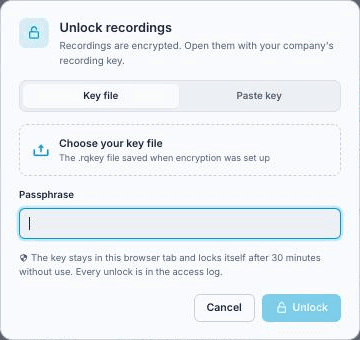
Locked calls show a lock. Unlock once with the key file and passphrase, then play, read the transcript and download as usual.
Listen on the phone
Add the key file once in the RingQ app. Encrypted recordings then play after Face ID or a fingerprint.
Every access logged
Each unlock, play, transcript view, download and wrong-key try is kept with who, which call, IP address and device.
Owner in control
Only the account owner turns it on, changes the key or turns it off. Admins with the key file can listen.
Locks itself
An unlocked key locks again after 15, 30 or 60 minutes without use, and on sign-out.
Strict
Unlock once, then listen as usual
Choose your key file and type its passphrase. The key stays in that browser tab, locks itself when not used, and every unlock is written to the access log.
RingQ app
Play any recording on your phone
On iPhone and Android, recordings open from the caller's page. With Strict, add your key file once in Settings > Recording key; after that Face ID or a fingerprint unlocks it.
- 1Open Recents or Contacts and tap the person you spoke with.
- 2Under Recent Calls, calls with a recording say Recording, or Encrypted recording with Strict.
- 3Tap the call to open its recording page.
- 4Tap Play. Standard plays at once; Strict asks for Face ID or a fingerprint first.
- 5Tap Show transcript for the transcript, AI summary and sentiment.
Encrypted recording
Customer
Today, 10:42 · 4:18
Compliance
Built for the rules you work under
Recording encryption helps you meet the security requirements below. Your own obligations depend on how you use recordings; this is not legal advice.
| Framework | Requirement | How recording encryption helps |
|---|---|---|
| PDPA (Singapore) | Protection Obligation: reasonable security arrangements for personal data | Recordings and transcripts are encrypted at rest by default; with Strict, only your company holds the key. Access is limited and logged. |
| PDPA (Malaysia) | Security Principle: protect personal data from loss, misuse and unauthorised access | Encrypted on the server, in remote archives and in backups; only the account owner chooses the level and manages keys. |
| GDPR | Art. 32: encryption of personal data · Art. 34(3)(a): data rendered unintelligible | Stolen files or backups cannot be played without the key. With Strict, nobody outside your company has that key. |
| PCI DSS v4.0 | Req. 3.5: stored account data unreadable · Req. 10: log access | Stored recordings are unreadable without the key and access is logged. Card security codes must still never be recorded: pause recording while a card is read. |
| ISO/IEC 27001:2022 | A.8.24 Use of cryptography · A.8.15 Logging · A.8.13 Information backup | Per-recording AES-256 encryption, an access log, and encrypted backups. |
RingQ itself is certified to ISO/IEC 27001:2022.
Availability
- Standard is on by default for new recordings on dedicated (single-tenant) RingQ servers
- Strict (your own key) is optional, for single-tenant servers licensed for 24 or more concurrent calls
- Web app on any current browser; RingQ app for iPhone and Android
Recordings made before encryption is turned on, and voicemails, are not locked. Turning it off later affects new recordings only: Standard recordings already encrypted still play, and Strict ones still need the key. See the full guide.