
AI Call Transcription
Every Call and Voicemail, Ready to Read
RingQ turns recorded calls and voicemails into searchable text, labelled Agent and Customer, with a short AI summary, right where you already look at your call logs.
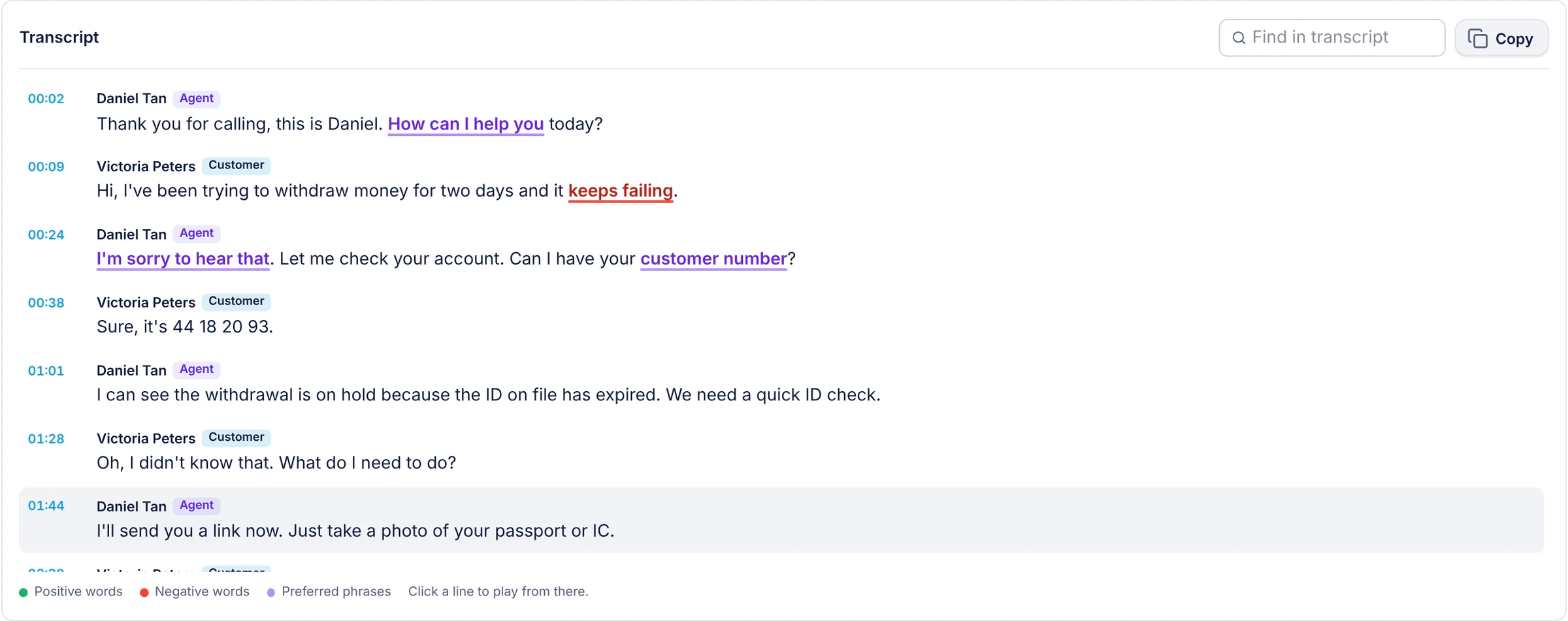
Speech to Text Built Into Your Reports
No separate transcription service to buy or upload recordings to. Turn it on once and transcripts appear with your calls.
Calls to Text
Recorded calls become text you can read in seconds instead of minutes of audio.
Who Said What
Agent and Customer labels on every line, from the separate sides of the call.
AI Summary
A short summary of the call next to the transcript.
Voicemail Too
Read voicemails from the Voicemails list instead of playing each one.
- 01Transcript
Read the Call Instead of Replaying It
Each line shows whether the agent or the customer said it, with a short AI summary of the call alongside. Supervisors can check what was promised, and agents can look back at a call without replaying the recording.
- Agent and Customer labels
- AI summary
- Calls and voicemails
- 02Summary and Insights
From Transcript to Insight
With the ChatGPT AI engine and your OpenAI token, every transcript also feeds AI Call Insights: a call score from 0 to 5, sentiment and topics on the recording timeline, and follow-ups the agent promised.
- 03Privacy
Protected Like Your Recordings
Transcripts and AI summaries are stored with the recording, so they can be encrypted on the server in the same way, and only users with permission to the recording can read them.
Set up in minutes
Three steps to transcribed calls
- 1
Turn on transcription
Go to Settings > Global Settings > AI Transcribe and switch on Enable Transcription.
- 2
Choose the AI engine
Use the RingQ AI engine for transcripts, or ChatGPT AI with your OpenAI token for full insights.
- 3
Make a call and read it
Open the call or voicemail in Reports and press Transcribe to see the text and summary.
Step-by-step instructions with screenshots: AI transcription guide
Frequently asked questions
What does RingQ AI call transcription do?
It converts recorded calls and voicemails into text, labels which lines the agent and the customer said, and adds a short AI summary, all inside RingQ reports.
Which AI engine is used?
You can use the RingQ AI engine for the transcript, or the ChatGPT AI engine with your own OpenAI token, which also gives AI Call Insights such as the call score, sentiment and topics.
Do I need to record calls?
Yes. Transcription works on recorded calls and on voicemails, so turn on recording for the extensions, queues or groups you want transcribed.
Where do I find the transcript?
Open the call in Reports or the voicemail in the Voicemails list and press Transcribe to see the text and the AI summary.
More RingQ AI