
AI Agent Coach
A Coach Beside Every Agent, on Every Call
RingQ AI Agent Coach shows your agents who is calling, a live transcript, suggested replies and the caller's mood while they talk, then writes the after-call note for them.
- Live
- Transcript
- 4
- Caller moods
- 2
- AI providers
- 1 click
- Note to CRM
Daniel Lee · Northwind Travel
Last note: asked about a refund for order 4471
I still haven't received my refund and it's been two weeks.
I'm sorry about that, let me check it for you right now.
Suggested reply
Copy“Your refund was approved on the 3rd. Refunds reach your card in 5 to 10 working days, so it should arrive by Friday. I'll email you the reference now.”
Source: Refund policy
Real-Time Agent Assist in the RingQ Softphone
No extra window or plug-in. Agent Coach opens next to the dialer when a call rings, and stays out of the way when there is no call.
Know Who Is Calling
Name, company and notes from contacts, the last wrap-up note, or a New caller tag, before you say hello.
Live Transcript
Your words and the customer's, labelled and on screen as the call happens.
Suggested Replies
After each customer sentence, a reply to copy or say in your own words, with links to the source.
Caller Mood
Positive, neutral, unhappy or angry, shown at the top so agents can adjust in time.
After-Call Notes
A summary, next step and outcome, ready to paste into your CRM in one click.
Private to the Agent
Suggestions are only on the agent's screen and are never spoken to the customer.
- 01During the Call
The Right Words, While the Customer Is Still Talking
When a call rings, the Agent Coach panel opens with who is calling. Once answered, the live transcript appears and a suggested reply follows each customer sentence, grounded in your business context and the knowledge base of an AI Receptionist you pick. Agents copy it or say it in their own words.
- Caller details
- Live transcript
- Suggested replies
- Knowledge sources
- 02After the Call
Notes Written for You
When the call ends, Agent Coach writes an after-call note with a summary, the next step and the outcome. Copy it into your CRM, ask for a fresh version, or press Summarise now during a long call to get a note early.
- Summary
- Next step
- Outcome
- Copy to CRM
After-call note
Write it againCopy note- Summary
- Customer chased a refund for order 4471. Refund was approved on the 3rd; card credit expected by Friday.
- Next step
- Email the refund reference today.
- Outcome
- Resolved
- 03Administrator Control
One Switch for the Whole Team
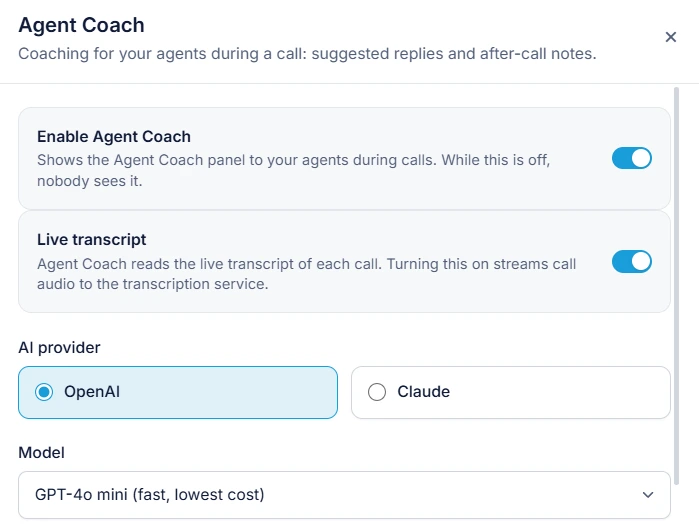
Agent Coach is off for everyone until an administrator turns it on. Choose OpenAI or Claude and the model, add the API key once (it is checked, stored encrypted and never shown again), and write up to 4,000 characters of company context. Agents can still switch it off for themselves from the small pill near the dialer.
- OpenAI or Claude
- Choice of model
- Encrypted keys
- Per-agent off switch
Set up in minutes
Three steps to coach every agent
- 1
Open Agent Assist
As an administrator, go to Settings > Agent Assist and turn on Enable Agent Coach.
- 2
Turn on the live transcript
Live transcript needs an OpenAI key; you can reuse the key you already saved.
- 3
Pick the AI and add context
Choose OpenAI or Claude, the model and key, then add your context and knowledge source.
Step-by-step instructions with screenshots: AI Agent Coach guide
Frequently asked questions
What is AI Agent Coach?
AI Agent Coach is RingQ's real-time agent assist. During a call it shows the agent who is calling, a live transcript, suggested replies and the caller's mood, and after the call it writes a note with a summary, next step and outcome.
Which AI does it use?
Suggested replies and notes use OpenAI or Claude, with the model you choose. The live transcript uses OpenAI, and can reuse the OpenAI key you already saved.
Does the customer hear the suggestions?
No. Suggestions are only shown to the agent and are never spoken to the customer. They are a help, not an instruction, so agents should check anything important before promising it.
Which calls does it work on?
Calls the agent places and calls dialled to their extension. Calls handled by an AI Receptionist are not transcribed in the agent's panel.
Can an agent turn it off?
Yes. The power icon on the Agent Coach pill turns it off for that agent only, and clicking the pill brings it back. Other agents are not affected.
Why Contact Centers Use AI Agent Coach
New agents give accurate answers from day one, with your knowledge base on screen.
More RingQ AI