
Meet AI
Meeting Summaries, Written for You
Meet AI writes the summary of your RingQ Meet meetings, so everyone can focus on the conversation. Use RingQ AI, included with no key needed, or your own OpenAI key.
Weekly sales sync
RingQ Meet · 32 min · 6 people
Summary
- Q4 pricing stays the same for existing customers.
- The partner webinar moves to 4 December.
- Support hours extend to 8 PM from next month.
Next steps
- EWSend the updated price listEmma Wilson
- RKBook the webinar roomRavi Kumar
AI Notes for Every Meeting
Meet AI is part of RingQ Meet, the video meetings and webinars built into RingQ. There is nothing extra to install.
No More Note-Taking
Everyone can join the conversation while Meet AI writes the summary.
RingQ AI Included
Use RingQ AI at no extra cost, with no AI key to set up.
Or Your Own OpenAI Key
Prefer your own account? Summaries are sent to OpenAI with your key.
Part of RingQ Meet
Works with the video meetings and webinars your team already runs in RingQ Meet.
- 01Summaries
The Meeting, in a Few Lines
When the meeting ends, Meet AI writes a short summary of what was discussed and the next steps, so people who missed it can catch up and everyone remembers what was agreed.
- 02Your Choice
RingQ AI or Your Own OpenAI Account
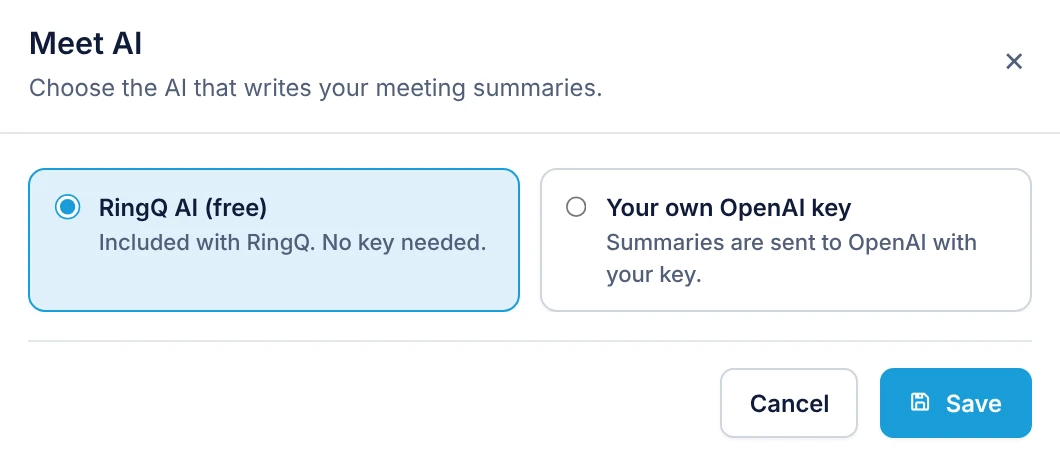
Each company picks the AI that writes its meeting summaries in Global Settings > Smart Intelligence > Meet AI. RingQ AI is included with RingQ and needs no key. If you prefer to use your own OpenAI account, paste your key and summaries are sent to OpenAI with it.
- RingQ AI (free)
- Your own OpenAI key
Set up in minutes
Three steps to AI meeting summaries
- 1
Open Meet AI
In the RingQ web app, go to Global Settings > Smart Intelligence > Meet AI.
- 2
Choose the AI
Keep RingQ AI (free) or pick Your own OpenAI key and paste the key.
- 3
Save and meet
Save, then hold your next RingQ Meet meeting and read the summary afterwards.
Frequently asked questions
What is Meet AI?
Meet AI is the RingQ Meet feature that writes a summary of your video meetings, so nobody has to take notes.
Does Meet AI cost extra?
No. RingQ AI is included with RingQ and needs no key. You can also choose to use your own OpenAI key, in which case OpenAI bills your account for the usage.
Where do I turn it on?
In the RingQ web app under Global Settings > Smart Intelligence > Meet AI. Each company on a multi-tenant system has its own setting.
More RingQ AI