Security update: RingQ is patched against the critical PHP vulnerabilities. Update your servers today.
Read nowRingQ has 29 reports in 7 groups, from queue statistics and agent performance to call logs with AI sentiment and a call heat map. Open Reports in the RingQ web app to see them all on one page, pick a date range, and view, download, email or schedule any report.
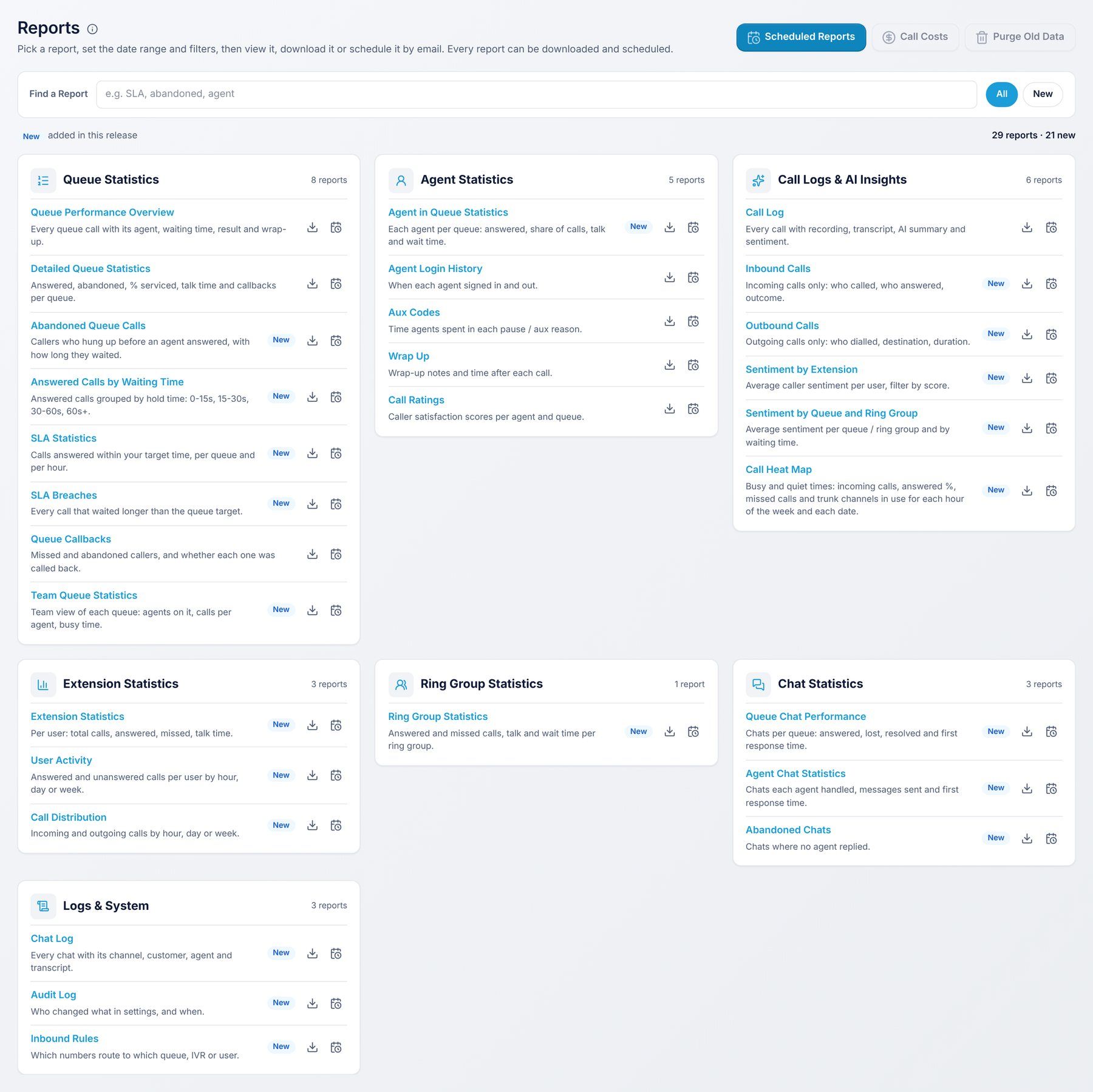
Reports show a Totals row at the bottom with the number of rows. Only users whose role allows Reports can open them.
Every report has the same buttons:
RingQ queue statistics reports show how your call center queues perform: how many calls were answered, how long callers waited, your service level (SLA), which callers hung up and whether they were called back. Read the Queue Statistics guide
| Report | What it shows |
|---|---|
| Queue Performance Overview | Every queue call with its agent, waiting time, result and wrap-up. |
| Detailed Queue Statistics | Answered, abandoned, % serviced, talk time and callbacks per queue. |
| Abandoned Queue Calls | Callers who hung up before an agent answered, with how long each one waited. |
| Answered Calls by Waiting Time | Answered calls grouped by how long the caller waited: 0-15 seconds, 15-30 seconds, 30-60 seconds and over 60 seconds. |
| SLA Statistics | The share of calls answered within your target time, per queue and per hour. |
| SLA Breaches | Every call that waited longer than the queue's target time. |
| Queue Callbacks | Missed and abandoned callers, and whether each one was called back. |
| Team Queue Statistics | A team view of each queue: the agents on it, calls per agent and busy time. |
RingQ agent statistics reports show what each agent did: the queue calls they answered, when they signed in and out, time spent in each pause reason, their wrap-ups and the ratings callers gave them. Read the Agent Statistics guide
| Report | What it shows |
|---|---|
| Agent in Queue Statistics | Each agent per queue: calls answered, share of the queue's calls, talk time and waiting time. |
| Agent Login History | When each agent signed in and out. |
| Aux Codes | Time agents spent in each pause (aux) reason, such as Lunch or Meeting. |
| Wrap Up | The wrap-up code, notes and time after each call. |
| Call Ratings | Caller satisfaction scores per agent and per queue. |
Every RingQ call is in the call log with its recording, transcript and AI summary. The sentiment reports show how callers felt, and the Call Heat Map shows your busiest and quietest hours so you can plan staff and phone lines. Read the Call Logs & AI Insights guide
| Report | What it shows |
|---|---|
| Call Log | Every call with its recording, transcript, AI summary and sentiment. |
| Inbound Calls | Incoming calls only: who called, who answered and the outcome. |
| Outbound Calls | Outgoing calls only: who dialled, the number called and the duration. |
| Sentiment by Extension | The average caller sentiment for each user, with the share of positive, neutral and negative calls. |
| Sentiment by Queue and Ring Group | The average sentiment for each queue and ring group, and how sentiment changes with waiting time. |
| Call Heat Map | Incoming calls, answered %, missed calls and phone line (trunk) channels in use, for each hour of each weekday and for each date. |
RingQ extension statistics reports show the calls each user made and received, and how calls spread across hours, days and weeks. Read the Extension Statistics guide
| Report | What it shows |
|---|---|
| Extension Statistics | For each user: total calls, answered, missed and talk time. |
| User Activity | Answered and unanswered calls for each user, by hour, day or week. |
| Call Distribution | Incoming, outgoing and internal calls by hour, day or week. |
The RingQ ring group statistics report shows how calls to each ring group are answered. Read the Ring Group Statistics guide
| Report | What it shows |
|---|---|
| Ring Group Statistics | Answered and missed calls, talk time and waiting time for each ring group. |
RingQ chat statistics reports cover your website, WhatsApp and Facebook chats: how each chat queue performs, how each agent handles chats, and which chats got no reply. Read the Chat Statistics guide
| Report | What it shows |
|---|---|
| Queue Chat Performance | Chats per queue: answered, lost, resolved and first response time. |
| Agent Chat Statistics | Chats each agent handled, messages sent and first response time. |
| Abandoned Chats | Chats where no agent replied, per channel. |
These RingQ reports show every chat, every change made in settings, and where each of your phone numbers is routed. Read the Logs & System guide
| Report | What it shows |
|---|---|
| Chat Log | Every chat with its channel, customer, agent and transcript. |
| Audit Log | Who changed what in settings, and when, with the IP address. |
| Inbound Rules | Which phone numbers route to which queue, IVR or user, and whether each rule is enabled. |
