Why the RingQ tunnel needs exactly one open port, and how that keeps every deployment locked down by default
TCP 6010 · Token Authenticated · Zero Extra Ports
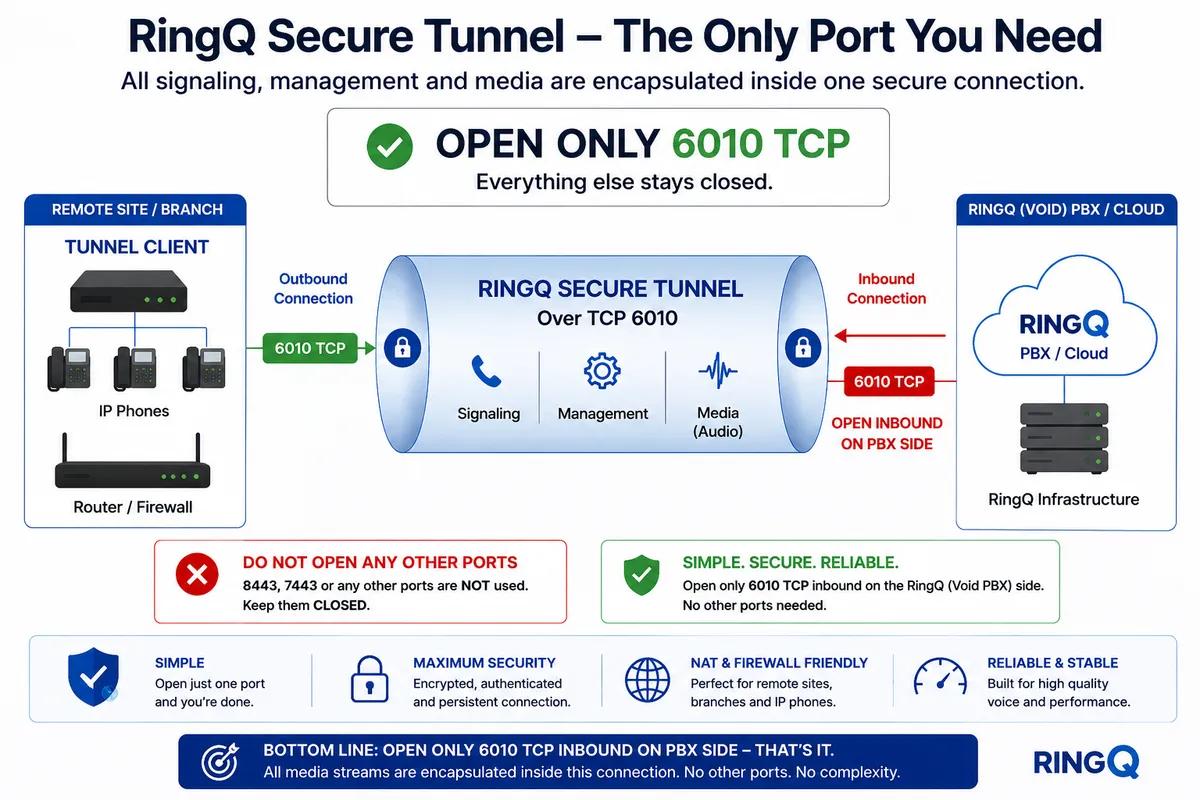
The RingQ Secure Tunnel is built around one idea: a site should never need more than one outbound port to run its entire phone system. Instead of opening separate ports for signaling, management, and audio, RingQ encapsulates all three inside a single persistent connection over TCP 6010.
That single connection is initiated outbound from the Tunnel Client at the remote site or branch. On the cloud (RingQ PBX) side, the only requirement is one inbound allowance for TCP 6010. Nothing else — 8443, 7443, or any other port — needs to be opened on the PBX side for the tunnel itself to function.
The tunnel isn’t just a raw TCP pipe — it’s an authenticated channel. Before any signaling or media is allowed to flow, the client and the cloud establish trust using an authentication token exchanged between the Tunnel Client and the RingQ cloud.
1
Client initiates
The Tunnel Client opens an outbound TCP 6010 connection to the RingQ cloud PBX.
2
Token exchange
The client presents its authentication token; the cloud validates it before allowing anything else through.
3
Tunnel established
Once authenticated, a single persistent, encrypted connection is held open between client and cloud.
4
Everything rides inside it
Signaling, management traffic, and media (audio) are all encapsulated inside that same authenticated connection — no separate channels, no separate ports.
ℹ Because the token is validated before the tunnel is trusted, an unauthenticated connection attempt on TCP 6010 gets nowhere — the port being open does not by itself grant access.
Every additional open port is a potential attack surface. By collapsing signaling, management, and media into one authenticated tunnel, the RingQ architecture removes that surface almost entirely on the PBX side.
✔ Bottom line: open only TCP 6010 inbound on the PBX side — that’s it. All media streams are encapsulated inside this one connection. No other ports, no added complexity.
This single tunnel isn’t limited to one type of device. Whatever is registered behind the Tunnel Client — physical desk phones or software clients — reaches the cloud PBX through the exact same authenticated TCP 6010 connection.
Physical IP Phones
Desk phones on the LAN register and place/receive calls through the tunnel without any direct exposure to the internet.
Softphones
Software clients on laptops or workstations use the same tunnel path for signaling and audio — no separate VPN or port rules needed.
Remote Sites / Branches
Each branch runs its own Tunnel Client, so multiple remote sites can connect to the same cloud PBX, each over its own single-port tunnel.
Because the tunnel carries signaling, management, and media uniformly, there’s no special-case configuration per device type or per site — the same one-port model applies everywhere.
