Administrator Guide
June 2026 | Advanced Configuration Reference
RingQ keeps advanced SIP trunk configuration straightforward. This guide covers every parameter in the Advanced Setting dialog, the Inbound Settings panel, and the Outbound and Emergency rule advanced options — so you can match your carrier's requirements without guesswork.
Who this is for: Administrators configuring SIP trunks, outbound routes, or emergency rules in the RingQ portal. Basic familiarity with SIP concepts (From header, DID routing, codecs) is helpful but not required.
1. General Parameters Top of Advanced Setting dialog
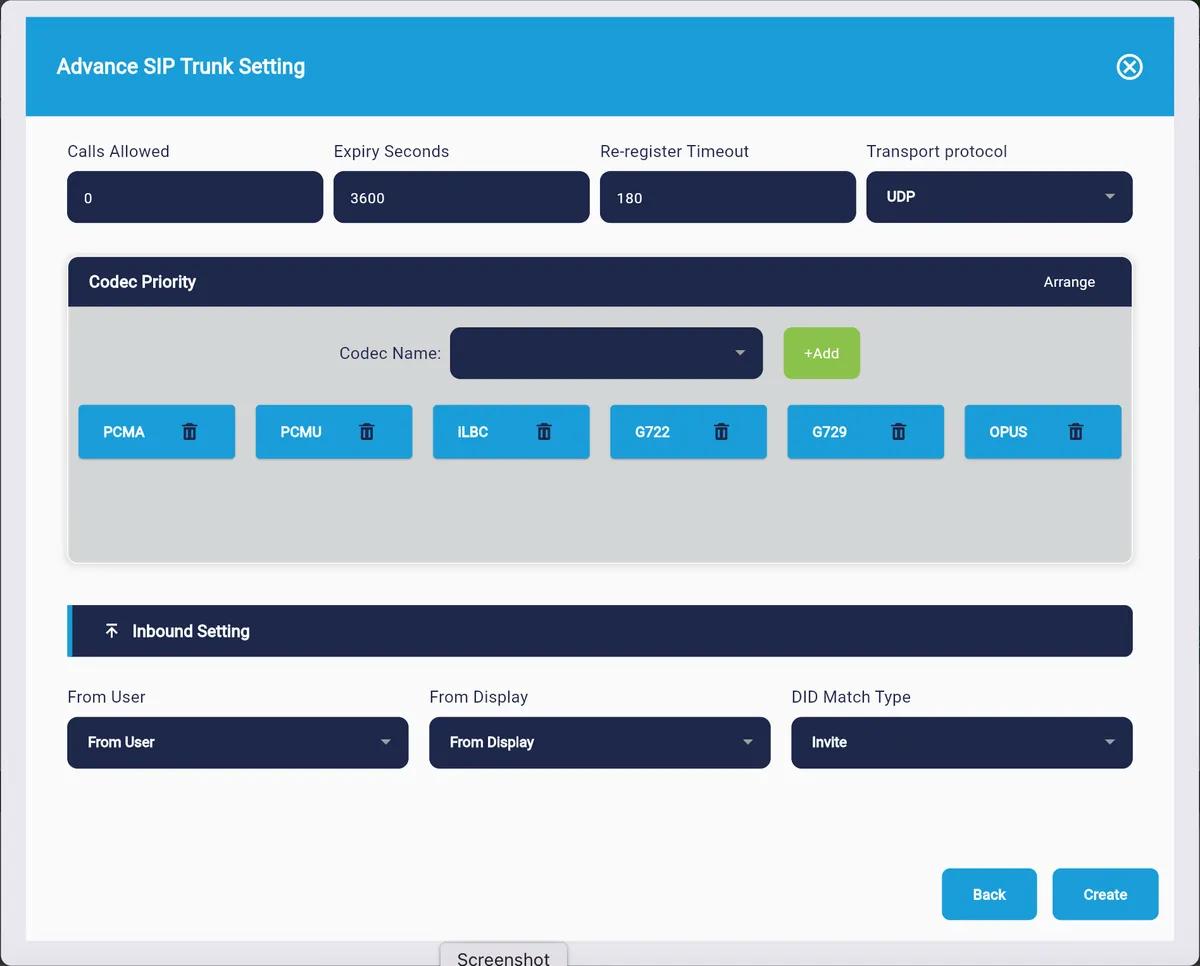
Figure 1 — Advanced SIP Trunk Setting dialog showing General Parameters, Codec Priority, and Inbound Setting
Sets the maximum number of simultaneous calls this trunk can carry. Set to 0 for unlimited. Your carrier's channel limit applies regardless — use it to prevent over-subscription or reserve bandwidth for other trunks.
How long each SIP registration is valid before RingQ sends a refresh REGISTER. Default is 3600 seconds (1 hour). Some carriers require shorter intervals (e.g. 300 s). Match whatever your carrier documentation specifies.
How often RingQ proactively sends a re-REGISTER before expiry. Default is 180 seconds. Keeping this shorter than Expiry Seconds ensures the trunk stays registered even if a packet is dropped.
The network protocol used for SIP signalling.
| Option | Description |
|---|---|
| UDP | Most common. Stateless, low overhead. Use unless your carrier requires otherwise. [Default] |
| TCP | Connection-oriented. Reliable delivery; preferred for long-distance or lossy links. |
| TLS | Encrypted SIP signalling. Required for SRTP-encrypted media and enterprise security. |
2. Codec Priority Ordered preference list
Codecs are listed in the order RingQ will offer them during SIP negotiation. The carrier picks the first codec from your list that it also supports. Drag to reorder using the Arrange button, or remove with the trash icon.
1 PCMA
2 PCMU
3 iLBC
4 G722
5 G729
6 OPUS
| Codec | Bandwidth | Quality | Typical Use |
|---|---|---|---|
| PCMA (G.711a) | 64 kbps | Good | EMEA carriers, legacy PSTNs |
| PCMU (G.711u) | 64 kbps | Good | North American carriers |
| iLBC | 15-16 kbps | Good | Packet-loss-tolerant links |
| G722 | 64 kbps | HD | Wideband HD voice, internal trunks |
| G729 | 8 kbps | Acceptable | Low-bandwidth WAN links |
| OPUS | 6-510 kbps | Excellent | WebRTC, modern SIP carriers |
Tip: Put the codec your carrier prefers at position 1. If your calls use G729 for international DID trunks, place it first to avoid transcoding overhead on the carrier side.
3. Inbound Settings How RingQ reads incoming SIP headers
These three fields tell RingQ where to look inside an incoming SIP INVITE to find the caller identity and the dialled number (DID). Different carriers write this information into different SIP headers — these settings let you match exactly.
Why this matters: If your carrier puts the CLI in the To header but RingQ is reading From, caller ID will be blank or incorrect. If the DID appears in the From header instead of the Invite URI, calls may not route to the right destination. Matching these to your carrier's SIP trace eliminates 90% of inbound routing issues.
Controls which SIP header field RingQ uses to extract the caller's user part (the number or SIP username of the person calling in).
| Option | Description |
|---|---|
| From User | Reads the user part of the From: header. Standard; most carriers use this. [Default] |
| From Display | Reads the display name portion of the From: header instead of the URI user part. |
| To User | Reads the user part of the To: header. Used by some wholesale carriers. |
| Invite | Reads the user part of the Request-URI (the INVITE line itself). |
Controls which SIP header field RingQ uses to extract the caller's display name (shown on the recipient's phone screen).
| Option | Description |
|---|---|
| From User | Uses the user part of the From: URI as the display name. |
| From Display | Uses the display name of the From: header. Most common source for caller name. [Default] |
| To User | Uses the To: header user part as the display name. |
| Invite | Uses the Request-URI user part as the display name. |
Tells RingQ which SIP header contains the dialled DID number. RingQ compares this against your inbound routes to decide where to send the call.
| Option | Description |
|---|---|
| Invite | Matches the DID against the user part of the Request-URI. SIP standard, most widely used. [Default] |
| From User | Matches the DID against the From: header user part. Some APAC carriers write the DID here. |
| From Display Name | Matches the DID against the display name in the From: header. |
| To User | Matches the DID against the To: header user part. |
4. Outbound Settings Per-route SIP header construction
These settings appear inside each Outbound Rule. They apply per route — so Route 1 can use different SIP header behaviour from Route 2 on the same trunk.
Why per-route? A single trunk may carry local, national, and international traffic through different provider routes. Each route may have its own caller ID requirements, which is why RingQ exposes this control at the route level.
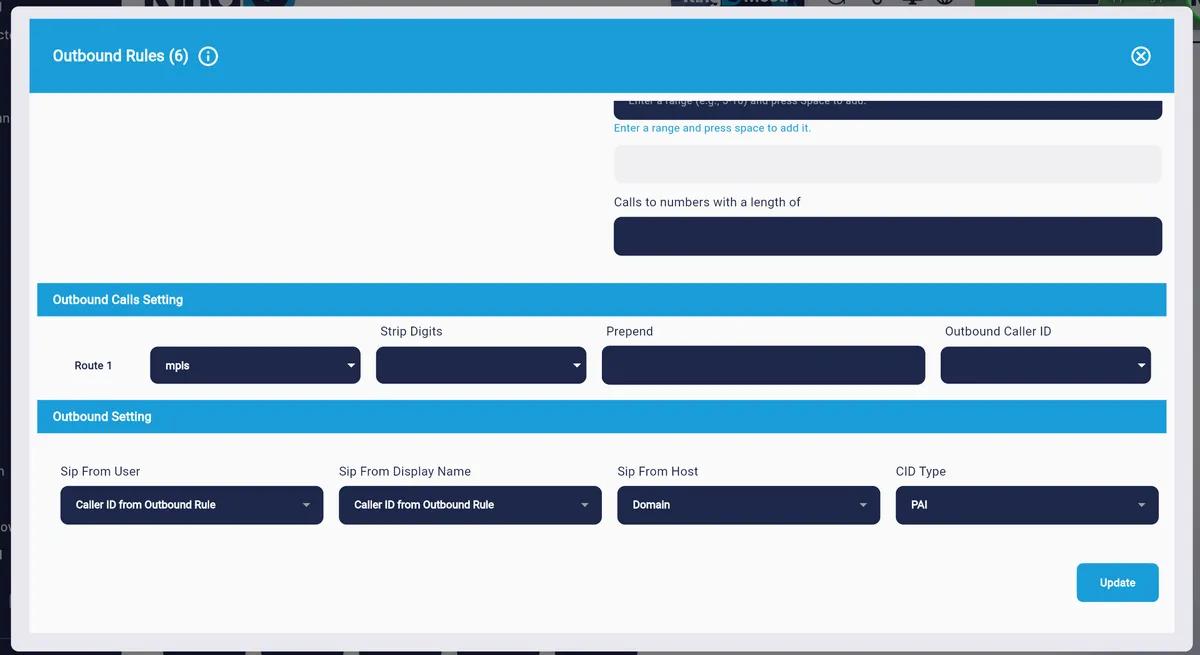
Figure 2 — Outbound Rules dialog showing Outbound Calls Setting and Outbound Setting (Advance Setting) sections
These two fields share the same set of 10 options. Sip From User populates the user part of the SIP From: URI. Sip From Display Name populates the display name portion of the From: header.
| Option | Description |
|---|---|
| Extension Name | Sends the calling extension's friendly name. Default for Emergency Rules. |
| Extension Number | Sends the calling extension's number. |
| Trunk Name | Sends the trunk's configured name. |
| SIP Auth ID | Sends the SIP authentication ID of the trunk. |
| SIP Username | Sends the SIP username configured on the trunk. |
| Outbound Rule Name | Sends the name of the outbound rule being used for this call. |
| Caller ID from Extension | Sends the Caller ID set on the originating extension. |
| Caller ID from Trunk | Sends the Caller ID configured on the trunk itself. |
| Caller ID from Outbound Rule | Sends the Outbound Caller ID on this route. Default for Outbound Rules. [Default] |
| Custom | Enter a fixed string to use regardless of the caller or route. |
Defines what appears as the host/domain part of the SIP From: URI (e.g. from:1234@yourdomain.com).
| Option | Description |
|---|---|
| Domain | Uses your RingQ system domain. Standard for most SIP carriers. [Default] |
| Default IP | Uses the system's public IP address. Required by carriers that authenticate by IP. |
| Custom | Enter a specific hostname or IP when the carrier requires a particular host value. |
Controls which SIP header carries the authoritative caller ID used for billing and CLI presentation.
| Option | Description |
|---|---|
| PAI | Uses the P-Asserted-Identity header. Standard for trusted, network-verified CLI. Most modern carriers prefer this. [Default] |
| RPID | Uses the Remote-Party-ID header. Required by older carriers that pre-date the PAI standard. |
| None | No extra identity header. CLI is taken only from the From: header. |
5. Emergency Rules — Advance Setting
The Advance Setting section inside Emergency Rules exposes the same four SIP header fields as Outbound Rules. However, the defaults differ: for emergency calls, RingQ sends the Extension Name so dispatchers can identify the caller, rather than a generic outbound caller ID.
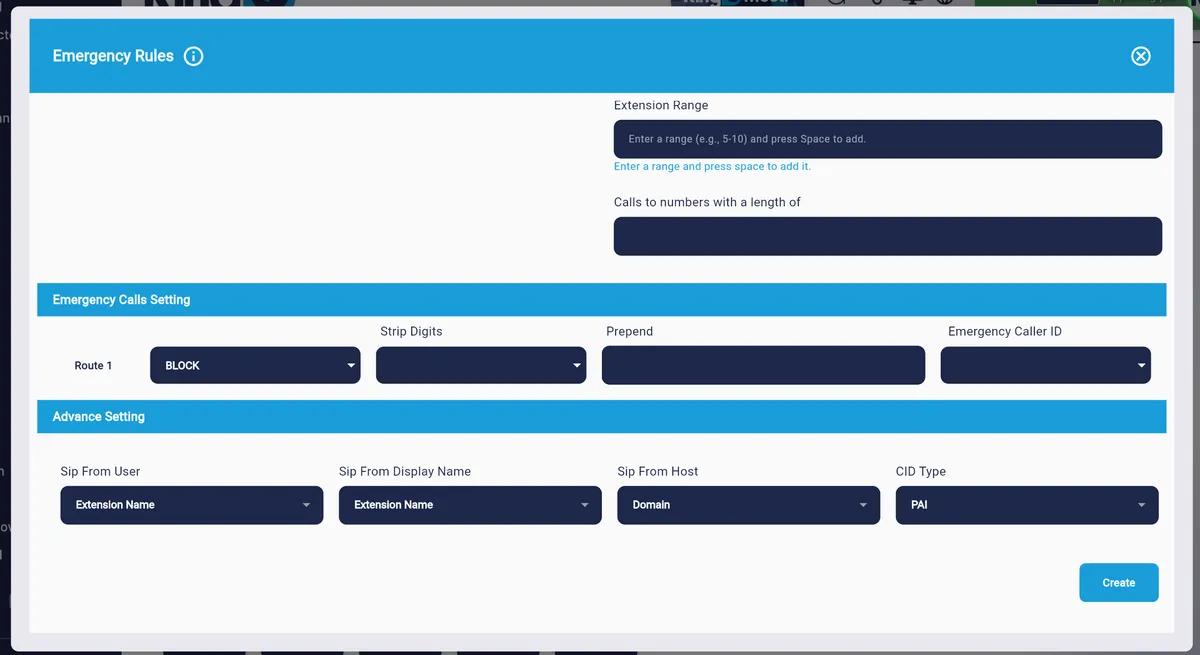
Figure 3 — Emergency Rules dialog showing Emergency Calls Setting and Advance Setting sections
Important: Do not set the Emergency Rule Route to BLOCK in a production environment. BLOCK prevents all calls matching that pattern from going out. Use it only in testing or when the trunk is not licensed for emergency calls.
The screenshots below show all available options for each dropdown in the Emergency Rules Advance Setting section.
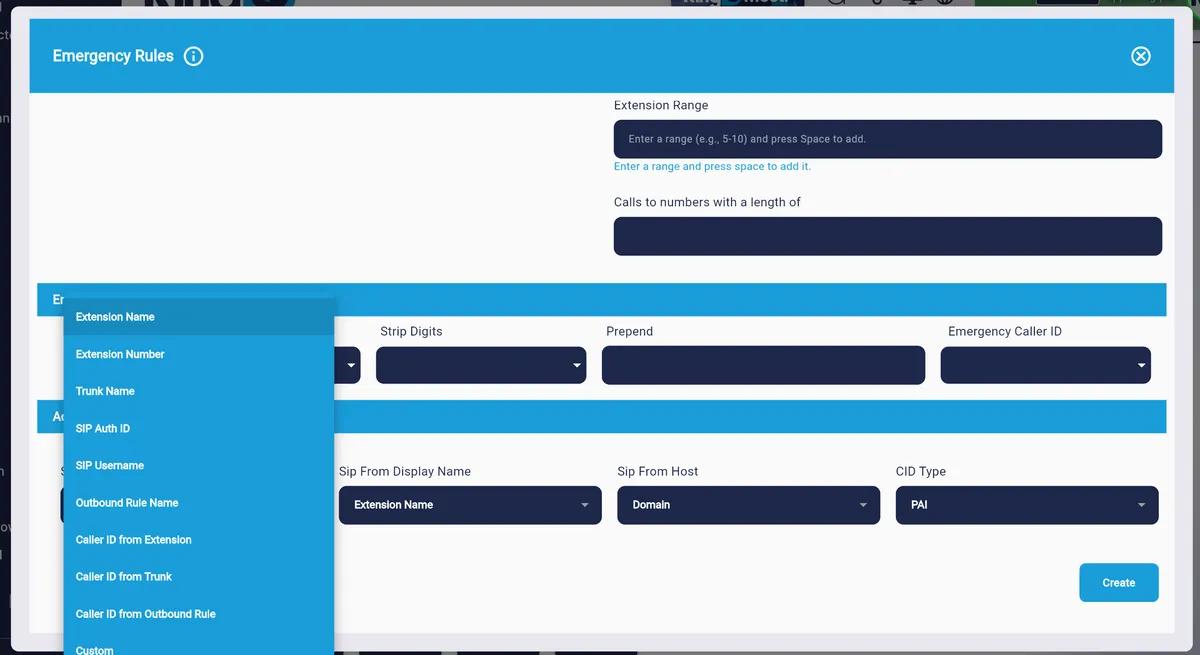
Figure 4a — Sip From User dropdown (10 options: Extension Name through Custom)
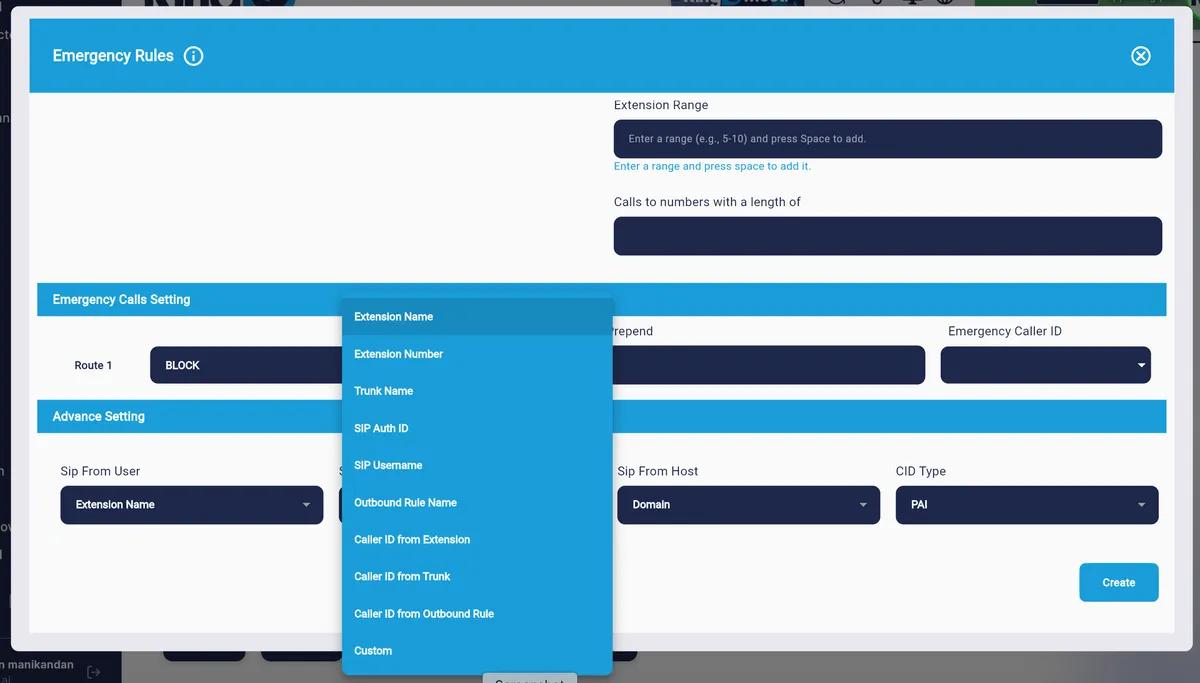
Figure 4b — Sip From Display Name dropdown (same 10 options)
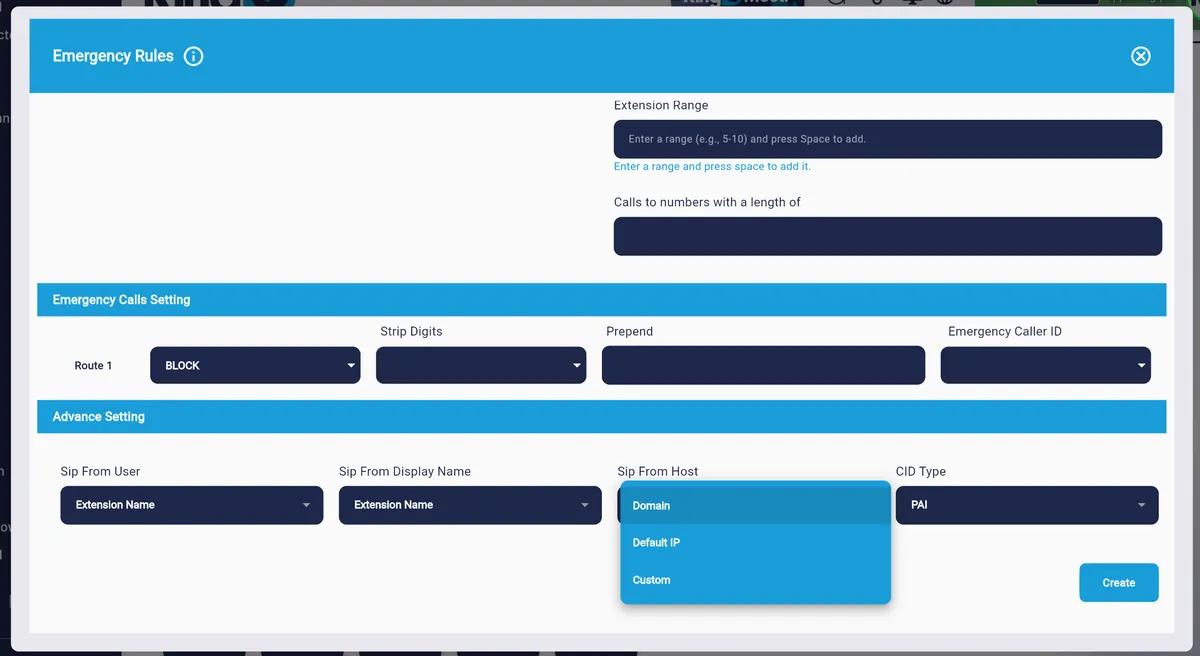
Figure 4c — Sip From Host dropdown (Domain, Default IP, Custom)
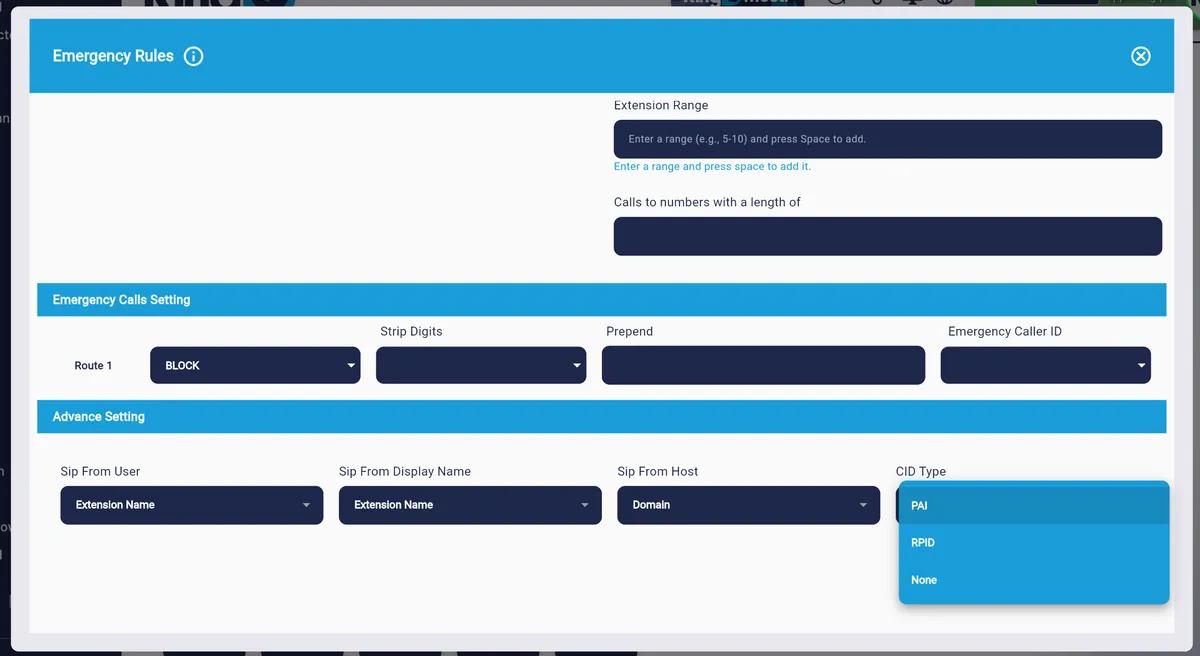
Figure 4d — CID Type dropdown (PAI, RPID, None)
| Field | Emergency Default | Outbound Default | Reason |
|---|---|---|---|
| Sip From User | Extension Name | Caller ID from Outbound Rule | Emergency services need to identify who called |
| Sip From Display Name | Extension Name | Caller ID from Outbound Rule | Dispatcher screen shows real person's name |
| Sip From Host | Domain | Domain | Same — domain identifies your system to PSAP |
| CID Type | PAI | PAI | Same — PAI is the trusted identity standard for E911 |
6. Common Configuration Scenarios
These ready-made configurations cover the situations administrators encounter most often.
Carriers like Twilio, Bandwidth, Vonage — From header carries the CLI, INVITE URI carries the DID.
| Field | Setting |
|---|---|
| From User | From User |
| From Display | From Display |
| DID Match Type | Invite |
| CID Type | PAI |
| Transport | UDP |
Some APAC carriers send the DID in the From User rather than the Request-URI.
| Field | Setting |
|---|---|
| From User | From User |
| From Display | From Display |
| DID Match Type | From User |
| CID Type | PAI |
| Transport | UDP |
Older carriers using RPID for CLI and placing the DID in the To header.
| Field | Setting |
|---|---|
| From User | From User |
| From Display | From Display |
| DID Match Type | To User |
| CID Type (Outbound) | RPID |
| Sip From Host | Default IP |
| Transport | TCP |
Secure trunks for HIPAA, finance, or government environments requiring encrypted signalling.
| Field | Setting |
|---|---|
| Transport | TLS |
| DID Match Type | Invite |
| CID Type | PAI |
| Codec Priority #1 | OPUS |
| Expiry Seconds | 300 |
7. Quick Field Reference All fields across all dialogs
| Field | Dialog | Default | Notes |
|---|---|---|---|
| Calls Allowed | Advanced Setting | 0 (unlimited) | Set to limit concurrent calls |
| Expiry Seconds | Advanced Setting | 3600 | Match carrier registration interval |
| Re-register Timeout | Advanced Setting | 180 | Must be less than Expiry Seconds |
| Transport Protocol | Advanced Setting | UDP | Use TLS for encrypted signalling |
| Codec Priority | Advanced Setting | PCMA, PCMU, iLBC, G722, G729, OPUS | Arrange per carrier preference |
| From User | Inbound Setting | From User | Source for caller's user part |
| From Display | Inbound Setting | From Display | Source for caller's display name |
| DID Match Type | Inbound Setting | Invite | Source for matching inbound DID |
| Sip From User | Outbound / Emergency | Caller ID from Rule / Extension Name | 10 options incl. Trunk Name, SIP Auth ID, Custom |
| Sip From Display Name | Outbound / Emergency | Caller ID from Rule / Extension Name | Same 10 options as Sip From User |
| Sip From Host | Outbound / Emergency | Domain | Domain, Default IP, or Custom |
| CID Type | Outbound / Emergency | PAI | PAI, RPID, or None |
