Complete firewall port reference for every RingQ deployment scenario — SIP phones, mobile, desktop, WebApp, Meet, SIP trunks, admin, and secure tunnel — with copy-ready port lists and step-by-step router configuration for Cisco, DrayTek, pfSense, SonicWall, WatchGuard, and FortiGate.
Port 5061 (SIP TLS) is TCP-only. STUN/TURN servers (3478–3479) are configured on the device — not a firewall rule. All other ports listed are firewall rules.
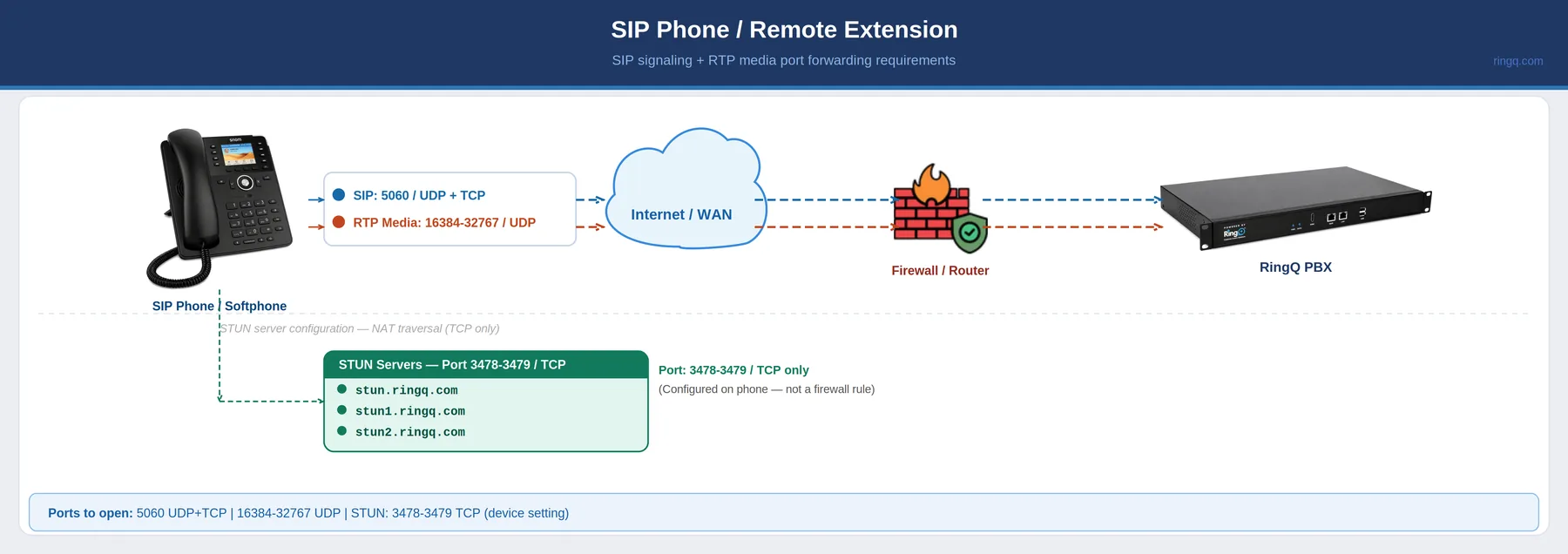
A remote SIP phone or softphone registers to the RingQ PBX over the internet. SIP signaling travels on port 5060, and voice audio flows over the RTP port range. NAT traversal uses the RingQ STUN servers — configured on the phone itself, not in the firewall.
| Port(s) | Protocol | Direction | Purpose |
|---|---|---|---|
| 5060 | UDP+TCP | Inbound | SIP signaling (standard) |
| 16384–32767 | UDP | Inbound | RTP voice media (primary range) |
STUN Servers — NAT Traversal (Port 3478–3479 TCP)
Configure directly on the SIP phone — this is not a firewall rule: stun.ringq.com · stun1.ringq.com · stun2.ringq.com
Copy and paste into your firewall configuration, or send to your IT team.
UDP Inbound: 5060, 16384-32767
TCP Inbound: 5060
STUN (device setting only): stun.ringq.com, stun1.ringq.com, stun2.ringq.com — port 3478-3479 TCP
Use case: SIP Phone / Remote Extension
UDP Inbound
TCP Inbound
STUN — device setting, not firewall
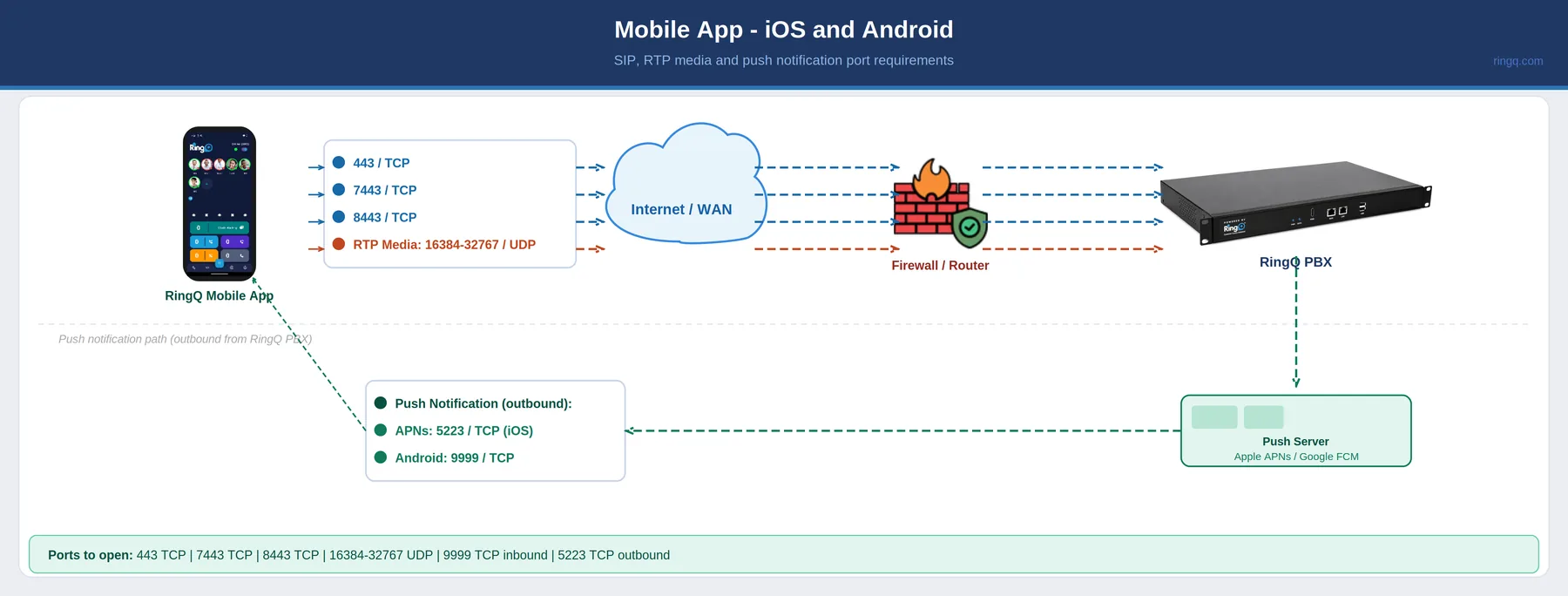
The RingQ mobile app uses secure TCP connections for signaling and RTP for voice. Push notifications for incoming calls route from the RingQ PBX outbound through Apple APNs (port 5223) for iOS and inbound on port 9999 for Android.
| Port(s) | Protocol | Direction | Purpose |
|---|---|---|---|
| 443 | TCP | Inbound | HTTPS / secure signaling |
| 7443 | TCP | Inbound | RingQ WSS alternate |
| 8443 | TCP | Inbound | RingQ backend HTTPS |
| 16384–32767 | UDP | Inbound | RTP voice media |
| 9999 | TCP | Inbound | Android push notification |
| 5223 | TCP | Outbound | Apple Push Notification (APNs) — iOS |
Copy and paste into your firewall configuration, or send to your IT team.
TCP Inbound: 443, 7443, 8443, 9999
UDP Inbound: 16384-32767
TCP Outbound: 5223 (Apple APNs — required for iOS push)
Use case: Mobile App (iOS and Android)
TCP Inbound
UDP Inbound
TCP Outbound
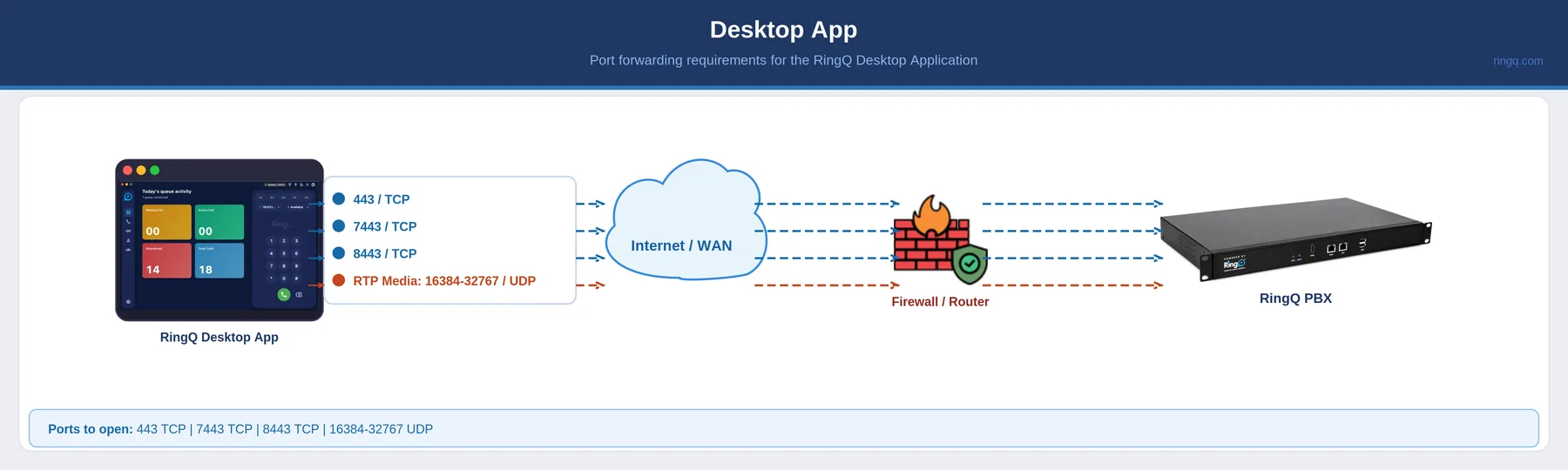
The RingQ desktop app connects over the same secure TCP ports as the WebApp for signaling, with voice carried on the RTP range. No push-notification ports are required — the desktop client keeps a persistent connection while running.
| Port(s) | Protocol | Direction | Purpose |
|---|---|---|---|
| 443 | TCP | Inbound | HTTPS / secure signaling |
| 7443 | TCP | Inbound | RingQ WSS alternate |
| 8443 | TCP | Inbound | RingQ backend HTTPS |
| 16384–32767 | UDP | Inbound | RTP voice media |
No push notifications required for Desktop App.
Copy and paste into your firewall configuration, or send to your IT team.
TCP Inbound: 443, 7443, 8443
UDP Inbound: 16384-32767
Note: No push notifications required for Desktop App.
Use case: RingQ Desktop Application
TCP Inbound
UDP Inbound
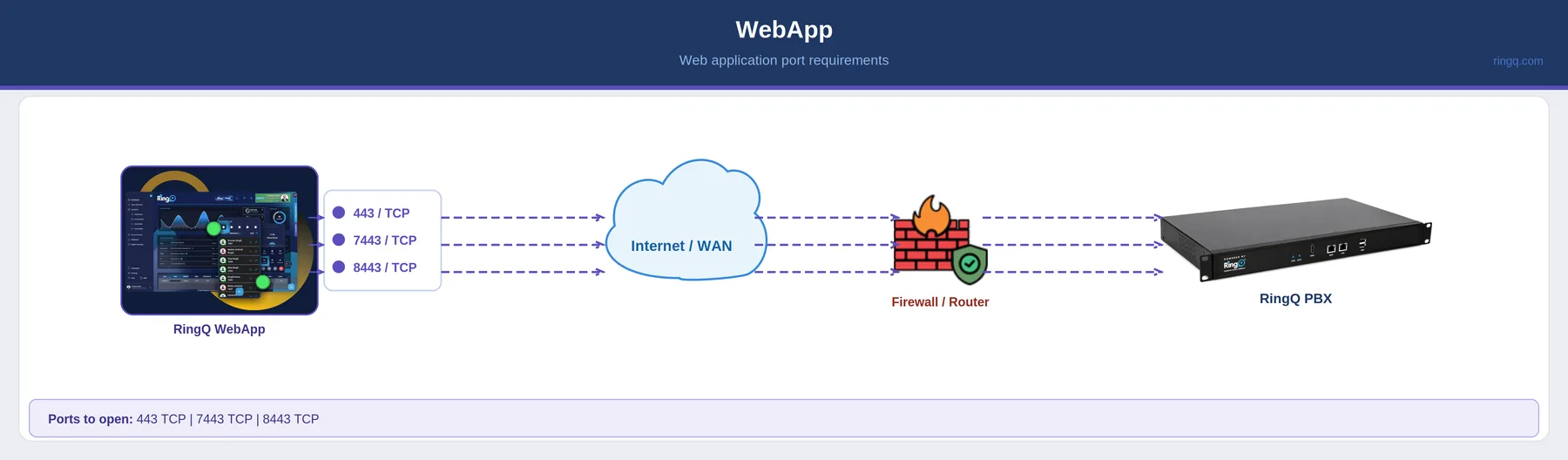
The browser-based RingQ WebApp needs only secure TCP ports — HTTPS for the app itself plus the WebSocket (WSS) and backend ports. Media is negotiated over WebRTC.
| Port(s) | Protocol | Direction | Purpose |
|---|---|---|---|
| 443 | TCP | Inbound | HTTPS / secure web access |
| 7443 | TCP | Inbound | RingQ WSS connection |
| 8443 | TCP | Inbound | RingQ backend HTTPS |
Copy and paste into your firewall configuration, or send to your IT team.
TCP Inbound: 443, 7443, 8443
Use case: RingQ WebApp (browser-based)
TCP Inbound only
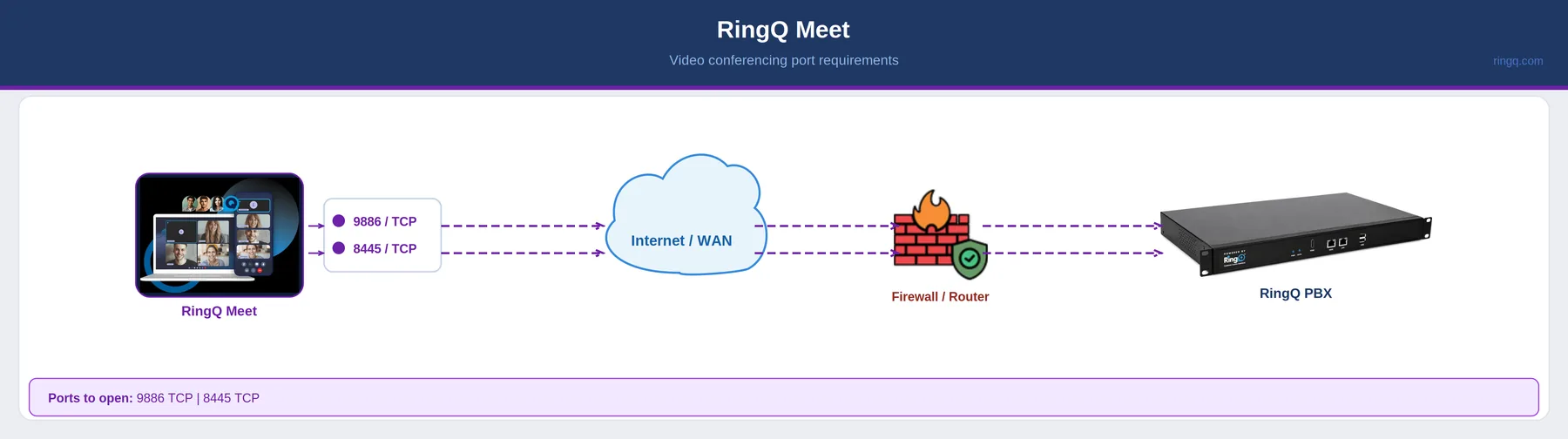
RingQ Meet video conferencing uses two dedicated TCP ports — one for the primary media connection and one for signaling.
| Port(s) | Protocol | Direction | Purpose |
|---|---|---|---|
| 9886 | TCP | Inbound | RingQ Meet — primary |
| 8445 | TCP | Inbound | RingQ Meet — signaling |
Copy and paste into your firewall configuration, or send to your IT team.
TCP Inbound: 9886, 8445
Use case: RingQ Meet (video conferencing)
TCP Inbound only
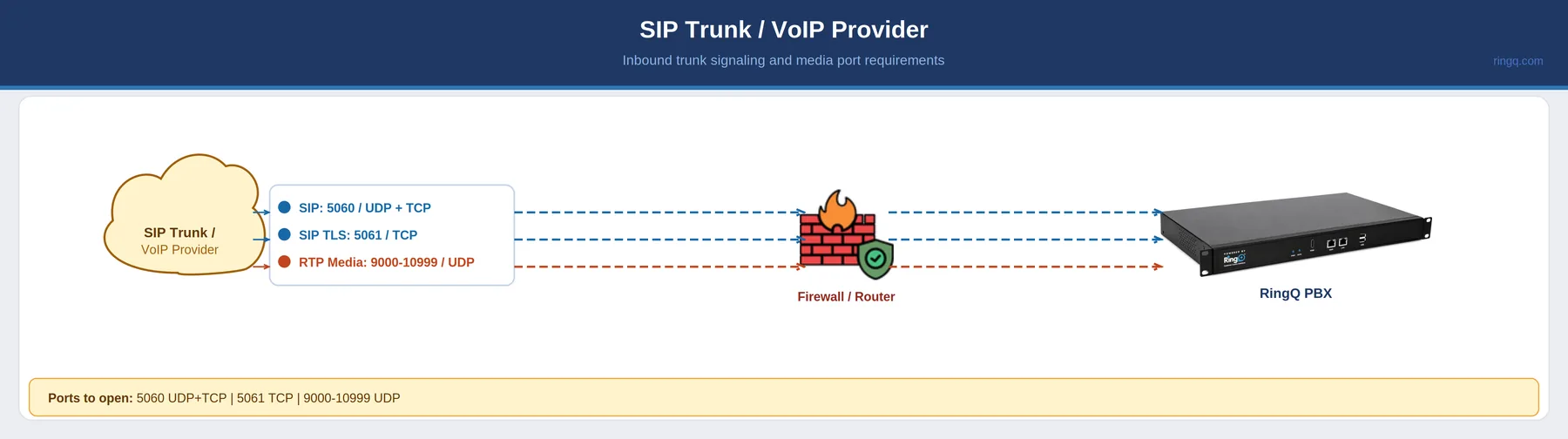
A SIP trunk from a VoIP provider terminates on the RingQ PBX. Signaling runs on 5060 (or 5061 for TLS) and the provider's RTP media uses a dedicated trunk range.
| Port(s) | Protocol | Direction | Purpose |
|---|---|---|---|
| 5060 | UDP+TCP | Inbound | SIP signaling (standard) |
| 5061 | TCP | Inbound | SIP TLS — encrypted signaling |
| 9000–10999 | UDP | Inbound | RTP media — trunk range |
Copy and paste into your firewall configuration, or send to your IT team.
UDP Inbound: 5060, 9000-10999
TCP Inbound: 5060, 5061
Use case: SIP Trunk / VoIP Provider
UDP Inbound
TCP Inbound
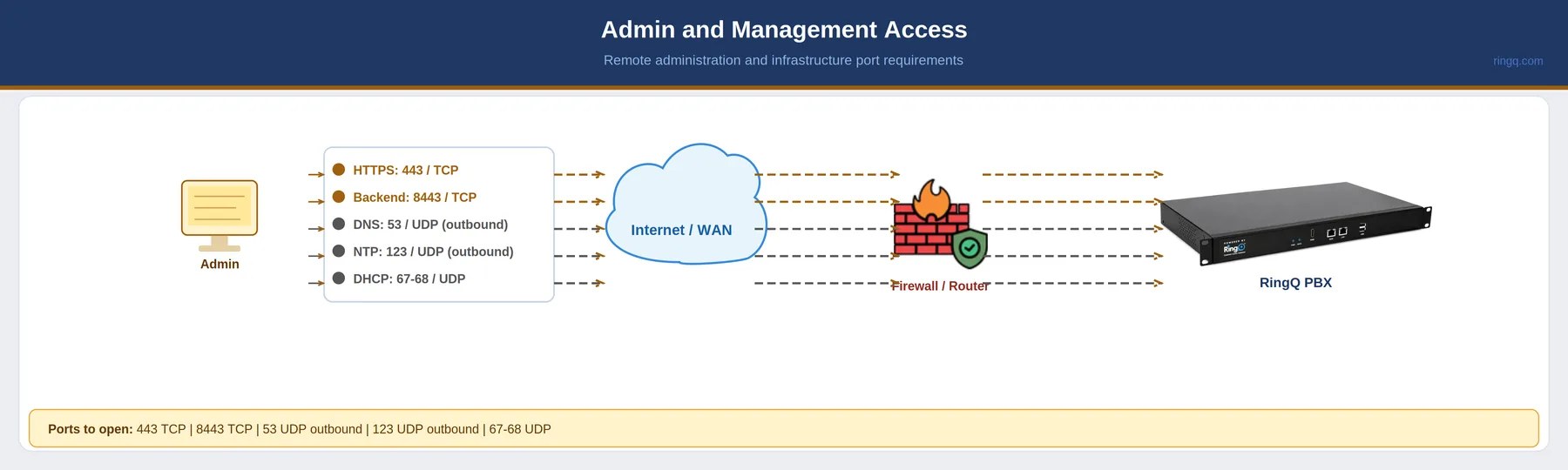
Administrative and management access to the RingQ PBX. The web console uses HTTPS, while the server itself reaches out for DNS and NTP and accepts DHCP on the local network.
| Port(s) | Protocol | Direction | Purpose |
|---|---|---|---|
| 443 | TCP | Inbound | HTTPS — secure web access |
| 8443 | TCP | Inbound | RingQ backend HTTPS |
| 53 | UDP | Outbound | DNS — name resolution |
| 123 | UDP | Outbound | NTP — time synchronisation |
| 67–68 | UDP | Inbound | DHCP |
Copy and paste into your firewall configuration, or send to your IT team.
TCP Inbound: 443, 8443
UDP Inbound: 67, 68
UDP Outbound: 53 (DNS), 123 (NTP)
Use case: Admin and Management Access
TCP Inbound
UDP Inbound
UDP Outbound
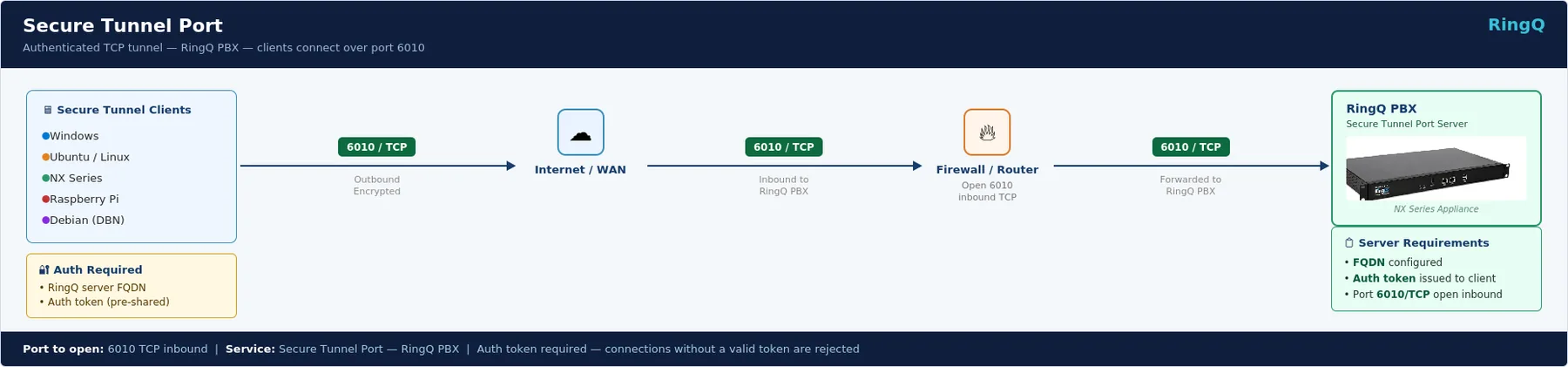
An authenticated TCP tunnel that lets client devices reach the RingQ server over a single encrypted port — no per-service SIP/media ports need to be exposed on the firewall.
The Secure Tunnel is an authenticated TCP tunnel service that lets client devices establish an encrypted connection to the RingQ server without exposing individual SIP/media ports on the firewall. It uses a single TCP port (6010) and requires two credentials to connect: the RingQ server FQDN and a pre-shared authentication token. Without a valid token, no connection is established.
| Port(s) | Protocol | Direction | Purpose |
|---|---|---|---|
| 6010 | TCP | Inbound | Secure Tunnel — encrypted client connection to RingQ PBX |
| Client Type | Details |
|---|---|
| Windows | Standard Windows PC or server running the Secure Tunnel client software. |
| Ubuntu / Linux | Any Linux distribution running the tunnel client, including Ubuntu and other Debian-based systems. |
| NX Series | RingQ NX hardware appliances (e.g. NX32, NX96, NX256) — Linux-based devices that connect via the Secure Tunnel. |
| Raspberry Pi | Raspberry Pi devices running Linux with the Secure Tunnel client installed. |
| Debian | Debian-based Linux systems running the tunnel client. |
Copy and paste into your firewall configuration, or send to your IT team.
TCP Inbound: 6010
Use case: Secure Tunnel (authenticated client connection to RingQ PBX)
Auth required: RingQ server FQDN + pre-shared auth token
Two credentials needed to connect
TCP Inbound only
| Port(s) | Protocol | Direction | Use Case | Purpose |
|---|---|---|---|---|
| SIP Signaling | ||||
| 5060 | UDP+TCP | Inbound | SIP Phone, SIP Trunk | SIP signaling (standard) |
| 5061 | TCP | Inbound | SIP Trunk | SIP TLS — encrypted signaling |
| Secure Web / WSS | ||||
| 443 | TCP | Inbound | Mobile, Desktop, WebApp, Admin | HTTPS / secure signaling |
| 7443 | TCP | Inbound | Mobile, Desktop, WebApp | RingQ WSS alternate |
| 8443 | TCP | Inbound | Mobile, Desktop, WebApp, Admin | RingQ backend HTTPS |
| RTP Media | ||||
| 5004–5005 | UDP | Inbound | SIP Phone | RTP / RTCP standard ports |
| 9000–10999 | UDP | Inbound | SIP Trunk | RTP media — trunk range |
| 16384–32767 | UDP | Inbound | SIP Phone, Mobile, Desktop | RTP voice media (primary range) |
| 48000–65535 | UDP | Inbound | WebApp | WebRTC audio/video streams |
| Push Notifications | ||||
| 9999 | TCP | Inbound | Mobile App | Android push notification |
| 5223 | TCP | Outbound | Mobile App | Apple APNs — iOS push notification |
| RingQ Meet | ||||
| 9886 | TCP | Inbound | RingQ Meet | RingQ Meet — primary |
| 8445 | TCP | Inbound | RingQ Meet | RingQ Meet — signaling |
| STUN / NAT Traversal | ||||
| 3478–3479 | TCP | Device | SIP Phone | STUN/TURN — set on device, not firewall |
| Infrastructure | ||||
| 53 | UDP | Outbound | Admin | DNS — name resolution |
| 67–68 | UDP | Inbound | Admin | DHCP — dynamic IP addressing |
| 123 | UDP | Outbound | Admin | NTP — time synchronisation |
| Secure Tunnel Port | ||||
| 6010 | TCP | Inbound | Windows, Ubuntu/Linux, NX Series, Raspberry Pi, Debian | Secure Tunnel — authenticated encrypted connection to RingQ PBX |
Complete port list across all scenarios — use as a reference for full firewall configuration.
== SIP SIGNALING ==
UDP+TCP Inbound: 5060
TCP Inbound: 5061

== SECURE WEB / WSS ==
TCP Inbound: 443, 7443, 8443

== RTP MEDIA ==
UDP Inbound: 5004-5005, 9000-10999, 16384-32767, 48000-65535

== PUSH NOTIFICATIONS ==
TCP Inbound: 9999
TCP Outbound: 5223 (Apple APNs)

== RINGQ MEET ==
TCP Inbound: 9886, 8445

== STUN / NAT (device setting — not firewall) ==
TCP: 3478-3479 (stun.ringq.com, stun1.ringq.com, stun2.ringq.com)

== INFRASTRUCTURE ==
UDP Outbound: 53 (DNS), 123 (NTP)
UDP Inbound: 67-68 (DHCP)

== SECURE TUNNEL PORT ==
TCP Inbound: 6010 (authenticated tunnel — Windows, Ubuntu/Linux, NX Series, Raspberry Pi, Debian; requires server FQDN + auth token)
Firewall & Router Configuration
Step-by-step port-forwarding setup for popular firewall models. Select your device below.
For Cisco ASA, ISR, or Meraki with web interface
Cisco ASA NAT Rule
If using ASA, also add a NAT rule: object network RINGQ_SERVER / host <SERVER_IP> / nat (inside,outside) static <PUBLIC_IP>
! ── RingQ Port Forwarding — Cisco IOS ──
! Replace <SERVER_IP> with your RingQ PBX IP

! SIP Signaling (TCP + UDP)
ip access-list extended RINGQ_IN
 permit udp any host <SERVER_IP> eq 5060
 permit tcp any host <SERVER_IP> eq 5060
 permit tcp any host <SERVER_IP> eq 5061

! RTP Media
 permit udp any host <SERVER_IP> range 16384 32767
 permit udp any host <SERVER_IP> range 9000 10999

! Secure Web / WSS
 permit tcp any host <SERVER_IP> eq 443
 permit tcp any host <SERVER_IP> eq 7443
 permit tcp any host <SERVER_IP> eq 8443

! Push Notifications
 permit tcp any host <SERVER_IP> eq 9999

! RingQ Meet
 permit tcp any host <SERVER_IP> eq 9886
 permit tcp any host <SERVER_IP> eq 8445

! Secure Tunnel Port
 permit tcp any host <SERVER_IP> eq 6010

! Apply to WAN interface (replace GigabitEthernet0/0)
interface GigabitEthernet0/0
ip access-group RINGQ_IN in| Port(s) | Protocol | Dir | Service |
|---|---|---|---|
| 5060 | UDP+TCP | In | SIP |
| 5061 | TCP | In | SIP TLS |
| 443 | TCP | In | HTTPS |
| 7443 | TCP | In | WSS |
| 8443 | TCP | In | Backend |
| 9000–10999 | UDP | In | RTP Trunk |
| 16384–32767 | UDP | In | RTP Voice |
| 9999 | TCP | In | Android Push |
| 5223 | TCP | Out | Apple APNs |
| 9886 | TCP | In | Meet |
| 8445 | TCP | In | Meet Signal |
| 6010 | TCP | In | Secure Tunnel |
DrayTek Vigor 2960 / 3910 / 2865 series
! ── RingQ Port Forwarding — DrayTek Vigor ──
! Replace SERVER_IP with your RingQ PBX LAN IP

! Enable Port Redirection via CLI
ip nat portmap add tcp 5060 5060 SERVER_IP
ip nat portmap add udp 5060 5060 SERVER_IP
ip nat portmap add tcp 5061 5061 SERVER_IP
ip nat portmap add tcp 443 443 SERVER_IP
ip nat portmap add tcp 7443 7443 SERVER_IP
ip nat portmap add tcp 8443 8443 SERVER_IP
ip nat portmap add udp 16384 32767 SERVER_IP
ip nat portmap add udp 9000 10999 SERVER_IP
ip nat portmap add tcp 9999 9999 SERVER_IP
ip nat portmap add tcp 9886 9886 SERVER_IP
ip nat portmap add tcp 8445 8445 SERVER_IP
ip nat portmap add tcp 6010 6010 SERVER_IP

! Save config
sys commit| Port(s) | Protocol | Dir | Service |
|---|---|---|---|
| 5060 | UDP+TCP | In | SIP |
| 5061 | TCP | In | SIP TLS |
| 443 | TCP | In | HTTPS |
| 7443 | TCP | In | WSS |
| 8443 | TCP | In | Backend |
| 9000–10999 | UDP | In | RTP Trunk |
| 16384–32767 | UDP | In | RTP Voice |
| 9999 | TCP | In | Push |
| 9886 | TCP | In | Meet |
| 8445 | TCP | In | Meet Signal |
| 6010 | TCP | In | Secure Tunnel |
pfSense 2.6+ / pfSense Plus
Use Aliases
Group all RingQ ports into an alias named RINGQ_PORTS (Firewall > Aliases) for cleaner rules.
Floating rule for APNs
For outbound APNs (port 5223), go to Firewall > Rules > Floating and add a pass rule for TCP outbound port 5223 from the RingQ PBX IP.
<!-- pfSense Alias — paste in Diagnostics > Backup/Restore -->
<aliases>
  <alias>
    <name>RINGQ_TCP_PORTS</name>
    <type>port</type>
    <address>443 7443 8443 5060 5061 9999 9886 8445 6010</address>
    <descr>RingQ TCP Ports</descr>
  </alias>
  <alias>
    <name>RINGQ_UDP_PORTS</name>
    <type>port</type>
    <address>5060 16384:32767 9000:10999</address>
    <descr>RingQ UDP Ports</descr>
  </alias>
</aliases>| Port(s) | Protocol | Dir | Service |
|---|---|---|---|
| 5060 | UDP+TCP | In | SIP |
| 5061 | TCP | In | SIP TLS |
| 443, 7443, 8443 | TCP | In | Web / WSS |
| 9000–10999 | UDP | In | RTP Trunk |
| 16384–32767 | UDP | In | RTP Voice |
| 9999 | TCP | In | Push |
| 9886, 8445 | TCP | In | Meet |
| 6010 | TCP | In | Secure Tunnel |
SonicWall TZ / NSA series — SonicOS 7.x
! ── RingQ — SonicWall SonicOS CLI ──
! Replace SERVER_IP with RingQ PBX LAN IP
! Replace PUBLIC_IP with your WAN IP

configure
  address-object ipv4 RINGQ_PBX host SERVER_IP zone LAN

  service-object tcp RINGQ_SIP_TCP port 5060 5060
  service-object udp RINGQ_SIP_UDP port 5060 5060
  service-object tcp RINGQ_SIP_TLS port 5061 5061
  service-object tcp RINGQ_HTTPS port 443 443
  service-object tcp RINGQ_WSS1 port 7443 7443
  service-object tcp RINGQ_WSS2 port 8443 8443
  service-object udp RINGQ_RTP port 16384 32767
  service-object udp RINGQ_TRUNK port 9000 10999
  service-object tcp RINGQ_PUSH port 9999 9999
  service-object tcp RINGQ_MEET1 port 9886 9886
  service-object tcp RINGQ_MEET2 port 8445 8445
  service-object tcp RINGQ_TUNNEL port 6010 6010

  service-group RINGQ_ALL
    service RINGQ_SIP_TCP
    service RINGQ_SIP_UDP
    service RINGQ_SIP_TLS
    service RINGQ_HTTPS
    service RINGQ_WSS1
    service RINGQ_WSS2
    service RINGQ_RTP
    service RINGQ_TRUNK
    service RINGQ_PUSH
    service RINGQ_MEET1
    service RINGQ_MEET2
    service RINGQ_TUNNEL
  exit

  access-rule from WAN to LAN action allow
    source any
    destination RINGQ_PBX
    service RINGQ_ALL
  exit
commit| Port(s) | Protocol | Dir | Service |
|---|---|---|---|
| 5060 | UDP+TCP | In | SIP |
| 5061 | TCP | In | SIP TLS |
| 443 | TCP | In | HTTPS |
| 7443, 8443 | TCP | In | WSS |
| 16384–32767 | UDP | In | RTP Voice |
| 9000–10999 | UDP | In | RTP Trunk |
| 9999 | TCP | In | Push |
| 9886, 8445 | TCP | In | Meet |
| 6010 | TCP | In | Secure Tunnel |
WatchGuard Firebox — Fireware 12.x
Disable SIP ALG
Disable the SIP Application Layer Gateway so it doesn't rewrite SIP headers: Network > Network Settings > Global Settings and uncheck Enable SIP Transformation.
! ── RingQ — WatchGuard Fireware CLI ──
! Connect via SSH or WSM CLI

! Create host alias
alias RINGQ_PBX {
  host SERVER_IP
}

! Create packet filter policy
policy RINGQ_INBOUND {
  type packet-filter
  from { any-external }
  to { RINGQ_PBX }
  protocol tcp { 5060 5061 443 7443 8443 9999 9886 8445 6010 }
  protocol udp { 5060 16384-32767 9000-10999 }
  action allow
  log enable
}

! Outbound for APNs
policy RINGQ_APNS_OUT {
  type packet-filter
  from { RINGQ_PBX }
  to { any-external }
  protocol tcp { 5223 }
  action allow
}

save| Port(s) | Protocol | Dir | Service |
|---|---|---|---|
| 5060 | UDP+TCP | In | SIP |
| 5061 | TCP | In | SIP TLS |
| 443 | TCP | In | HTTPS |
| 7443, 8443 | TCP | In | WSS |
| 16384–32767 | UDP | In | RTP Voice |
| 9000–10999 | UDP | In | RTP Trunk |
| 9999 | TCP | In | Push |
| 5223 | TCP | Out | APNs (out) |
| 9886, 8445 | TCP | In | Meet |
| 6010 | TCP | In | Secure Tunnel |
FortiGate 60F / 100F / 200F — FortiOS 7.x
FortiGate SIP ALG must be disabled
FortiGate rewrites SIP headers by default, breaking registration and calls. The CLI above disables the SIP helper and SIP NAT trace. Verify with: get system session-helper — ensure no entry with protocol=17 port=5060 exists.
VIP Group
After creating all VIPs, group them under Policy & Objects > VIP Groups (name it RINGQ_VIP_GROUP) and reference it in the firewall policy for cleaner management.
! ── RingQ — FortiGate FortiOS CLI ──
! Replace SERVER_IP with RingQ PBX LAN IP
! Replace PUBLIC_IP with WAN IP

! ── STEP 1: Disable SIP ALG (CRITICAL) ──
config system settings
  set sip-helper disable
  set sip-nat-trace disable
end

config system session-helper
  delete 13
end

! ── STEP 2: Create address object ──
config firewall address
  edit "RINGQ_PBX"
    set type ipmask
    set subnet SERVER_IP 255.255.255.255
  next
end

! ── STEP 3: Create Virtual IP (Port Forward) ──
config firewall vip
  edit "VIP_RINGQ_SIP"
    set extip PUBLIC_IP
    set mappedip SERVER_IP
    set extintf wan1
    set portforward enable
    set protocol tcp
    set extport 5060
    set mappedport 5060
  next
  edit "VIP_RINGQ_RTP"
    set extip PUBLIC_IP
    set mappedip SERVER_IP
    set extintf wan1
    set portforward enable
    set protocol udp
    set extport 16384-32767
    set mappedport 16384-32767
  next
  edit "VIP_RINGQ_TUNNEL"
    set extip PUBLIC_IP
    set mappedip SERVER_IP
    set extintf wan1
    set portforward enable
    set protocol tcp
    set extport 6010
    set mappedport 6010
  next
end

! ── STEP 4: Create firewall policy ──
config firewall policy
  edit 0
    set name "RINGQ_INBOUND"
    set srcintf wan1
    set dstintf internal
    set srcaddr all
    set dstaddr "RINGQ_PBX"
    set action accept
    set schedule always
    set service ALL
    set nat enable
  next
end| Port(s) | Protocol | Dir | Service |
|---|---|---|---|
| 5060 | TCP | In | SIP (TCP) |
| 5060 | UDP | In | SIP (UDP) |
| 5061 | TCP | In | SIP TLS |
| 443 | TCP | In | HTTPS |
| 7443, 8443 | TCP | In | WSS |
| 16384–32767 | UDP | In | RTP Voice |
| 9000–10999 | UDP | In | RTP Trunk |
| 9999 | TCP | In | Push |
| 9886, 8445 | TCP | In | Meet |
| 6010 | TCP | In | Secure Tunnel |
